End-of-day balances answer one plain question: how much was in the account when the day closed? A transaction table only stores movements, so you build the balance yourself. The tricky part is the days when nothing happened.

Two accounts and six days
Think of a manager who asks why Tuesday’s balance in a report does not match the bank statement. We will build the answer from raw movements. Positive amounts are deposits and negative amounts are withdrawals. The calendar table lists every day we want a balance for, including quiet ones.
DROP TABLE IF EXISTS #Calendar;
DROP TABLE IF EXISTS #Transactions;
CREATE TABLE #Transactions (TxnId int PRIMARY KEY, AccountId int NOT NULL,
                            TxnTime datetime2(0) NOT NULL, Amount decimal(10,2) NOT NULL);
CREATE TABLE #Calendar (Day date PRIMARY KEY);
INSERT #Transactions VALUES
    (1, 1, '2026-03-01 09:15:00', 500.00), (2, 1, '2026-03-01 17:40:00', -120.00),
    (3, 1, '2026-03-02 23:55:00', -80.00), (4, 1, '2026-03-05 10:00:00', 300.00),
    (5, 2, '2026-03-01 08:00:00', 1000.00), (6, 2, '2026-03-03 12:30:00', -250.00),
    (7, 2, '2026-03-03 18:45:00', -100.00), (8, 2, '2026-03-05 23:59:00', 40.00);
INSERT #Calendar VALUES ('2026-03-01'), ('2026-03-02'), ('2026-03-03'),
                        ('2026-03-04'), ('2026-03-05'), ('2026-03-06');
Step one: one row per account per day
A day can hold many movements, so first collapse them. Cast the timestamp to a date and sum the amounts. After this step there is exactly one row per account per active day, and no ties to worry about later.
SELECT AccountId, CAST(TxnTime AS date) AS TxnDate,
       SUM(Amount) AS DayNet, COUNT(*) AS Txns
FROM #Transactions
GROUP BY AccountId, CAST(TxnTime AS date)
ORDER BY AccountId, TxnDate;
Account 1 has three active days and account 2 has three. Account 1 netted 380.00 on March 1, then minus 80.00 on March 2. Account 2 netted minus 350.00 on March 3 from two withdrawals.
Step two: a running total is the balance
The balance at the end of a day is every net movement up to and including that day. A windowed SUM does that. Partition by account, order by date, and say ROWS explicitly so the frame is never a surprise.
WITH daily AS (
    SELECT AccountId, CAST(TxnTime AS date) AS TxnDate, SUM(Amount) AS DayNet
    FROM #Transactions
    GROUP BY AccountId, CAST(TxnTime AS date)
)
SELECT AccountId, TxnDate, DayNet,
       SUM(DayNet) OVER (PARTITION BY AccountId ORDER BY TxnDate
                         ROWS UNBOUNDED PRECEDING) AS EndBalance
FROM daily
ORDER BY AccountId, TxnDate;
Account 1 ends March 1 at 380.00, March 2 at 300.00 and March 5 at 600.00. Account 2 ends March 1 at 1,000.00, March 3 at 650.00 and March 5 at 690.00. Correct, but there is no row for March 4, and a report that skips days looks broken.
Step three: quiet days need a calendar
A quiet day keeps the balance from the last day that had activity. So for every account and every calendar day, look back and take the most recent balance. OUTER APPLY with TOP (1) does exactly that. If an account has no history yet, the balance is zero.
WITH daily AS (
    SELECT AccountId, CAST(TxnTime AS date) AS TxnDate, SUM(Amount) AS DayNet
    FROM #Transactions
    GROUP BY AccountId, CAST(TxnTime AS date)
),
running AS (
    SELECT AccountId, TxnDate,
           SUM(DayNet) OVER (PARTITION BY AccountId ORDER BY TxnDate
                             ROWS UNBOUNDED PRECEDING) AS EndBalance
    FROM daily
)
SELECT a.AccountId, c.Day, COALESCE(x.EndBalance, 0) AS EndBalance
FROM (SELECT DISTINCT AccountId FROM #Transactions) AS a
CROSS JOIN #Calendar AS c
OUTER APPLY (SELECT TOP (1) r.EndBalance
             FROM running AS r
             WHERE r.AccountId = a.AccountId AND r.TxnDate <= c.Day
             ORDER BY r.TxnDate DESC) AS x
ORDER BY a.AccountId, c.Day;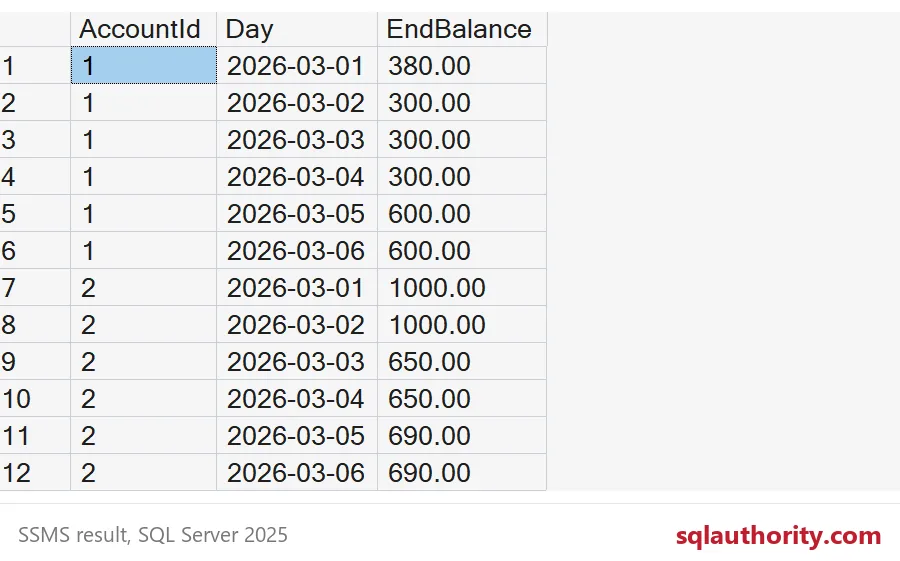
Twelve rows come back, six days for each account. March 4 now shows 300.00 for account 1 and 650.00 for account 2. March 6 repeats March 5. Every day has an honest balance.
Here is a cheap check you can run on your own server. The balance on the last day must equal the plain sum of all that account’s amounts. Account 1 sums to 600.00 and account 2 sums to 690.00, which match March 6. If your totals disagree, a transaction is landing outside your calendar range, or a timestamp is being compared the wrong way. The next section shows the usual culprit.

The midnight trap
The most common bug has nothing to do with windows. It is a date compared with a timestamp. When you write TxnTime <= a date, SQL Server treats the date as midnight at the start of that day. Everything that happened after 12:00 AM on the day is left out.
DECLARE @Day date = '2026-03-02';

SELECT SUM(CASE WHEN TxnTime <= @Day THEN Amount END) AS WrongBalance,
       SUM(CASE WHEN TxnTime < DATEADD(day, 1, @Day) THEN Amount END) AS RightBalance
FROM #Transactions
WHERE AccountId = 1;

DROP TABLE IF EXISTS #Calendar;
DROP TABLE IF EXISTS #Transactions;
For March 2, WrongBalance says 380.00 and RightBalance says 300.00. The missing 80.00 is the withdrawal at 11:55 PM, which is exactly the kind of late entry that makes Tuesday’s report disagree with the statement. Compare against the start of the next day, and use less than, never less than or equal.
When your own numbers and the bank disagree, check the clock before you check the math.
A balance is not a stored number, it is a running story.
Published by Pinal Dave on SQLAuthority. More of my work at pinaldave.com.
Discover more from SQL Authority with Pinal Dave
Subscribe to get the latest posts sent to your email.