
Every day I get many emails and blog comment with at least one new problem every day. Recently, one of my blog readers sent an email asking assistance. She already had two node Windows Cluster. Let us call them Node1 and Node2. SQL Server Clustered instance, was successfully installed on Node1. In SQL 2008 onwards, we need to run setup on Node2 and perform “AddNode” action by choosing below option. During that step, the rule Node and cluster edition match failed.
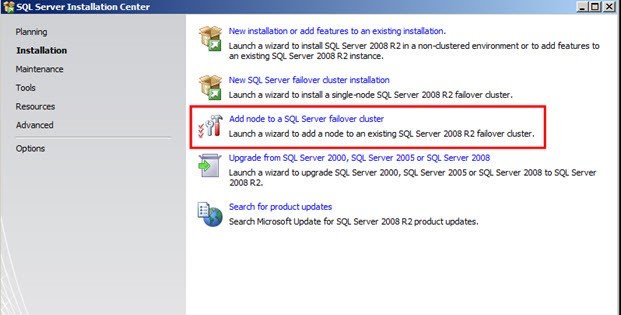
While performing AddNode, there was a Rule Failure.
—————————
Rule Check Result
—————————
Rule “Node and cluster edition match” failed.
The edition of the new node does not match the edition of the cluster.
—————————
OK
—————————
I asked to share the setup logs from Node2 and while looking at them, I found below.
2015-03-10 12:00:22 Slp: Initializing rule : Node and cluster edition match
2015-03-10 12:00:22 Slp: Rule applied features : ALL
2015-03-10 12:00:22 Slp: Rule is will be executed : True
2015-03-10 12:00:22 Slp: Init rule target object: Microsoft.SqlServer.Configuration.SetupExtension.AddNodeEditionBlock
2015-03-10 12:00:22 Slp: The edition user specified is: ENTERPRISE
2015-03-10 12:00:22 Slp: The edition of the cluster instance: STANDARD
2015-03-10 12:00:22 Slp: Evaluating rule : AddNodeEditionBlock
2015-03-10 12:00:22 Slp: Rule running on machine: Node2
2015-03-10 12:00:22 Slp: Rule evaluation done : Failed
2015-03-10 12:00:22 Slp: Rule evaluation message: The edition of the new node does not match the edition of the cluster.
If you closely look at the highlighted lines, you should be able to understand the issue. In case you didn’t understand – here is the issue.
SQL Server 2008 R2, which is installed is of Edition “Standard” edition (shown as an edition of clustered instance). The media, which were getting used while trying to perform AddNode operation was of “Enterprise” edition (shown as user specified).
Solution of the issue is very straight forward. She was supposed to use the media of the same edition, which was installed on Node1. Here is the screen where we can see edition of media.
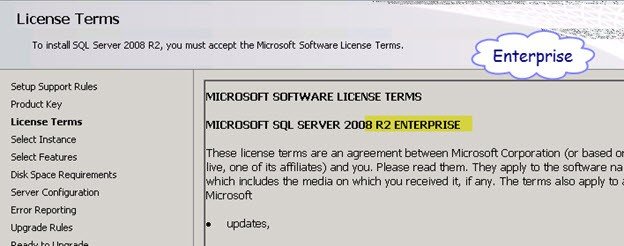
The edition of the media is decided by the product key provided in the previous screen.
Published by Pinal Dave on SQLAuthority. More of my work at pinaldave.com.

2 Comments. Leave new
Pinal Dave, Nice post. However, this will not solve her problem. She is attempting to add a third node to a cluster using STANDARD edition. Standard edition only supports 2 nodes: See https://docs.microsoft.com/en-us/previous-versions/sql/sql-server-2008-r2/cc645993(v=sql.105)#High_availability. The same holds true for 2012 & 2014.
To add a third node, first upgrade the Sql Server cluster edition to enterprise, then add additional nodes. Remember, because you just changed from STANDARD to ENTERPRISE, your LICENSE COSTS just drastically increased.
Remember, an in-place downgrade is not possible: you must uninstall/reinstall to get to a lower edition.
So while this reminds us that all Sql Server instance cluster nodes must be the same edition, we need to use care deciding on SQL Server features, and how the choice effects licensing and edition upgrade/downgrade issues.
Pinal Dave, thanks for your daily contributions!
Thanks for your comment Carm. You are absolutely correct.