This is a guest post by Reeves Smith. Why use Biml when SSIS already has a designer? Because many packages differ only in their metadata, and one XML description can generate all of them.

 Reeves Smith is a database expert from Linchpin People, a team of business intelligence specialists. Reeves introduces developers to Biml and answers the question below for them.
Why Use Biml When the Designer Works
If you doubt that Biml is useful, you’re not alone. After I introduce people to Biml, someone always asks how writing XML can help. I asked the same question when I started. A new skill has to improve my development work or add something to the tool belt. Why use Biml, then? Because it saves time when you build SSIS packages.
What Biml Is
Biml is an XML language that describes business intelligence projects. You write it inside Visual Studio with the BIDS Helper add-in, and it creates Integration Services (SSIS) projects. Biml is compatible with Analysis Services projects too, but not within the BIDS Helper add-in. The language has no formatting or layout. It’s built to script and automate, not to draw.
Packages That Differ Only in Metadata
Why would you automate SSIS if every package is different? Look at the packages in your company. Many are close copies, and only the metadata changes. Source packages are a typical case. They pull every row from a source table and load a stage table of the same shape. Most do little else.
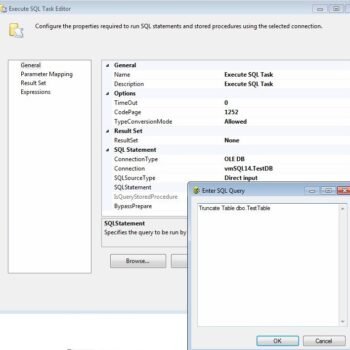
Such a package has two tasks. An Execute SQL task truncates the destination table. A data flow task reads the source table and writes the stage table. Between one package and the next, only the table name changes. These packages don’t follow every best practice. They show the idea.
The code below is Biml, which is XML and not T-SQL. It describes one source package for a table named Customer. The connection strings are shortened for display.
<Biml xmlns="http://schemas.varigence.com/biml.xsd">
  <Connections>
    <OleDbConnection Name="Source" ConnectionString="Provider=SQLOLEDB.1;Data Source=localhost;Initial Catalog=SourceDb;Integrated Security=SSPI" />
    <OleDbConnection Name="Stage" ConnectionString="Provider=SQLOLEDB.1;Data Source=localhost;Initial Catalog=StageDb;Integrated Security=SSPI" />
  </Connections>
  <Packages>
    <Package Name="Extract_Customer" ConstraintMode="Linear">
      <Tasks>
        <ExecuteSQL Name="SQLT - Truncate Customer" ConnectionName="Stage">
          <DirectInput>TRUNCATE TABLE dbo.Customer</DirectInput>
        </ExecuteSQL>
        <Dataflow Name="DAFL - Load Customer">
          <Transformations>
            <OleDbSource Name="OLE_SRC Customer" ConnectionName="Source">
              <ExternalTableInput Table="dbo.Customer" />
            </OleDbSource>
            <OleDbDestination Name="OLE_DST Customer" ConnectionName="Stage">
              <ExternalTableOutput Table="dbo.Customer" />
            </OleDbDestination>
          </Transformations>
        </Dataflow>
      </Tasks>
    </Package>
  </Packages>
</Biml>
So why write that XML to create five packages? You could draw them in the designer. The answer comes from comparing the two ways of working over a number of packages.
When Biml Pays Off
By hand, every package costs about one business day. One package takes one day, five take five, and so on. With Biml and BimlScript, you spend extra time up front. You write the Biml, then add the BimlScript that automates it. After that, each new package costs minutes. That investment makes projects with a small number of packages a poor fit.
Start With One Variable
BimlScript uses C# or Visual Basic as its scripting language. If that sounds like a second barrier, here is a way in. Learning Biml and BimlScript together is a lot to ask before the first project. Defer almost all of the C#, and add a single variable.
BimlScript is added right inside the Biml file, and it can replace items within the XML. A code nugget between the markers <# and #> runs code. A nugget that starts with <#= prints a value into the XML. The first line below declares the variable tableName. The other lines use it in eight places. They are the names of the package and the tasks, the truncate statement, and the two tables.
<Biml xmlns="http://schemas.varigence.com/biml.xsd">
  <# string tableName = "Customer"; #>
  <Connections>
    <OleDbConnection Name="Source" ConnectionString="Provider=SQLOLEDB.1;Data Source=localhost;Initial Catalog=SourceDb;Integrated Security=SSPI" />
    <OleDbConnection Name="Stage" ConnectionString="Provider=SQLOLEDB.1;Data Source=localhost;Initial Catalog=StageDb;Integrated Security=SSPI" />
  </Connections>
  <Packages>
    <Package Name="Extract_<#=tableName#>" ConstraintMode="Linear">
      <Tasks>
        <ExecuteSQL Name="SQLT - Truncate <#=tableName#>" ConnectionName="Stage">
          <DirectInput>TRUNCATE TABLE dbo.<#=tableName#></DirectInput>
        </ExecuteSQL>
        <Dataflow Name="DAFL - Load <#=tableName#>">
          <Transformations>
            <OleDbSource Name="OLE_SRC <#=tableName#>" ConnectionName="Source">
              <ExternalTableInput Table="dbo.<#=tableName#>" />
            </OleDbSource>
            <OleDbDestination Name="OLE_DST <#=tableName#>" ConnectionName="Stage">
              <ExternalTableOutput Table="dbo.<#=tableName#>" />
            </OleDbDestination>
          </Transformations>
        </Dataflow>
      </Tasks>
    </Package>
  </Packages>
</Biml>
A declaration alone changes nothing. A good test is to add it, run the add-in’s check for Biml errors, and regenerate the package. Nothing should change. Then add the print markers one at a time and check again.
To build the next package, change the value of tableName and regenerate. You can create several packages in a few minutes this way. It isn’t a perfect solution. It is a good technique on the way to learning Biml.
What to Remember
Why use Biml? It pays off when many packages share one design and only the metadata changes. With a small number of packages, the designer is faster. With many, the template wins, because the work repeats and the XML doesn’t.
Scripting is the place to focus after you learn Biml. Biml with BimlScript can provide huge savings in development effort once you’ve learned both.
Note from Pinal: The Biml above is untested, because the test server has no Biml tool. The connection strings use the old SQLOLEDB.1 provider for simplicity. Use the OLE DB driver that matches your SQL Server version. BIDS Helper belongs to older versions of Visual Studio, so check which Biml add-in your version supports. My advice is to count your packages first. A loop over a list of tables is the natural next step after this template.
A package is not a drawing, it is a description you can generate again.
Published by Pinal Dave on SQLAuthority. More of my work at pinaldave.com.
Discover more from SQL Authority with Pinal Dave
Subscribe to get the latest posts sent to your email.