For embeddings, casting JSON arrays to the vector type checks the shape, not the meaning. SQL Server 2025 will tell you when the count of numbers is wrong. It cannot tell you whether the numbers came from the right model.

Why embeddings arrive as text
Your application asks a model for an embedding and gets back a JSON array like [0.1,0.2,0.3]. It passes that string to SQL Server. The column wants a vector with a fixed number of dimensions. Somewhere between the string and the column, a cast has to happen.
Picture a nightly load that has worked for months. One night a few rows arrive with the wrong count of numbers. You want the good rows loaded and the bad ones set aside where you can read them in the morning. I use three-number vectors here so you can see every value.
Cast one valid array
A vector(3) variable accepts three numbers. CAST turns the JSON text into the native vector. Casting that vector back to nvarchar gives you text to read.
DECLARE @v vector(3) = CAST('[0.1,0.2,0.3]' AS vector(3));

SELECT @v AS native_vector, CAST(@v AS nvarchar(max)) AS vector_text;
Look at the text form. The 0.3 comes back as 3.0000001e-001. Nothing is broken. Vector values are stored as floating-point numbers, so the printed digits can differ from what you typed. Do not compare vectors by their text.
Watch the wrong dimension fail
Now cast an array with only two numbers into vector(3). I run the cast through sp_executesql inside TRY/CATCH, so the CATCH block hands you the error number and message.
BEGIN TRY
    EXEC sys.sp_executesql N'SELECT CAST(''[1,2]'' AS vector(3)) AS mismatched_vector;';
END TRY
BEGIN CATCH
    SELECT ERROR_NUMBER() AS error_number, ERROR_MESSAGE() AS dimension_error;
END CATCH;
The error is 42204, and the message says the vector dimensions 3 and 2 do not match. A fixed dimension is a contract. A plain CAST gives you an error, not a NULL, and an error at 2 AM is not what you want in a nightly load.
Stage the input, then use TRY_CAST
The fix is a staging table. Land the raw text first, with an id so you can trace each row. Then convert with TRY_CAST, which returns NULL instead of an error when the text does not fit. Here are four test rows: a good array, a short array, plain junk and a missing value.
DROP TABLE IF EXISTS #VectorStage, #VectorChecked, #VectorAccepted;

CREATE TABLE #VectorStage (id int PRIMARY KEY, raw_text nvarchar(1000));

INSERT #VectorStage (id, raw_text)
VALUES (1, N'[1,2,3]'), (2, N'[1,2]'), (3, N'invalid'), (4, NULL);

SELECT id, raw_text, TRY_CAST(raw_text AS vector(3)) AS converted_vector
INTO #VectorChecked
FROM #VectorStage;
Keep every block in this post in the same query window, because these are temporary tables. The raw text stays in #VectorStage the whole time. That is your evidence when someone asks why a row never made it.
Load the good rows and report the rest
Insert only the rows that converted. The destination column is NOT NULL, so a NULL vector could never get in anyway. Then report the rejects. One catch: TRY_CAST also gives NULL for a missing input, so I look at the raw text to tell Missing from Rejected.
CREATE TABLE #VectorAccepted (id int PRIMARY KEY, v vector(3) NOT NULL);

INSERT #VectorAccepted (id, v)
SELECT id, converted_vector
FROM #VectorChecked
WHERE converted_vector IS NOT NULL;

SELECT id, raw_text, CASE WHEN raw_text IS NULL THEN 'Missing' ELSE 'Rejected' END AS reason
FROM #VectorChecked
WHERE converted_vector IS NULL
ORDER BY id;

SELECT id, CAST(v AS nvarchar(max)) AS accepted_vector
FROM #VectorAccepted
ORDER BY id;
Never turn a reject into a vector of zeros just to make the load succeed. A zero vector looks valid and returns plausible but wrong search results. A rejected row you can see is far better than a fake row you cannot.

Read all four results together
The picture shows what the last four result grids look like in SSMS, from top to bottom. The valid cast, the dimension error, the two rejects with the missing value, and the one accepted row. The picture leaves out the empty mismatched_vector grid that appears just before the error.
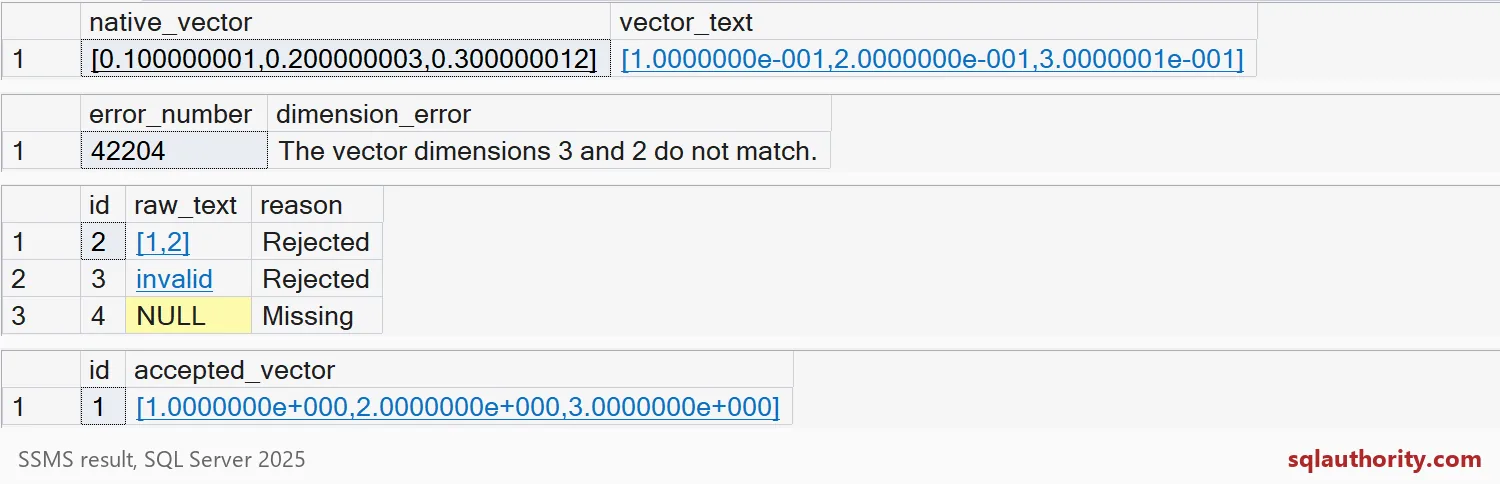
Rows 2 and 3 are Rejected, row 4 is Missing, and only id 1 reaches the accepted table. Run the same checks on your own embeddings, with your real dimension, before the first big load.
One more thing. If you switch to a model with a different number of dimensions, do not stretch the old column. Create a new column or table for the new model and keep both generations apart. The cast checks the count, not which model produced the numbers. The last block cleans up the temporary tables.
DROP TABLE IF EXISTS #VectorStage, #VectorChecked, #VectorAccepted;A small reject report today saves a long investigation after the next embedding load.
A vector cast is not model validation, it is a numeric shape check.
Published by Pinal Dave on SQLAuthority. More of my work at pinaldave.com.
Discover more from SQL Authority with Pinal Dave
Subscribe to get the latest posts sent to your email.