
It has been quite a long time since I posted SQL in Sixty Seconds Video. Here we are back with the new video. This one shows how to reset SA password in SQL Server.
One of the most popular question, I often receive is very similar to following:
“How do I reset the password for SA username?”
“I have forgotten the SA password, what should I do?”
“Our DBA just left the job and now noone knows how to reset the SA password. Please help.”
Solution
Honestly, it is pretty simple to reset the password for SA username. You just have to login to the system where your SQL Server is installed. Open SQL Server Management Studio and login with the help of Windows Authentication. As local system is the admin of the SQL Server, you will get access with administration privileges. Now, open the database, expand Security >> Login folder and right click over SA username. Now, it will bring up the screen where you can change the password for SA.
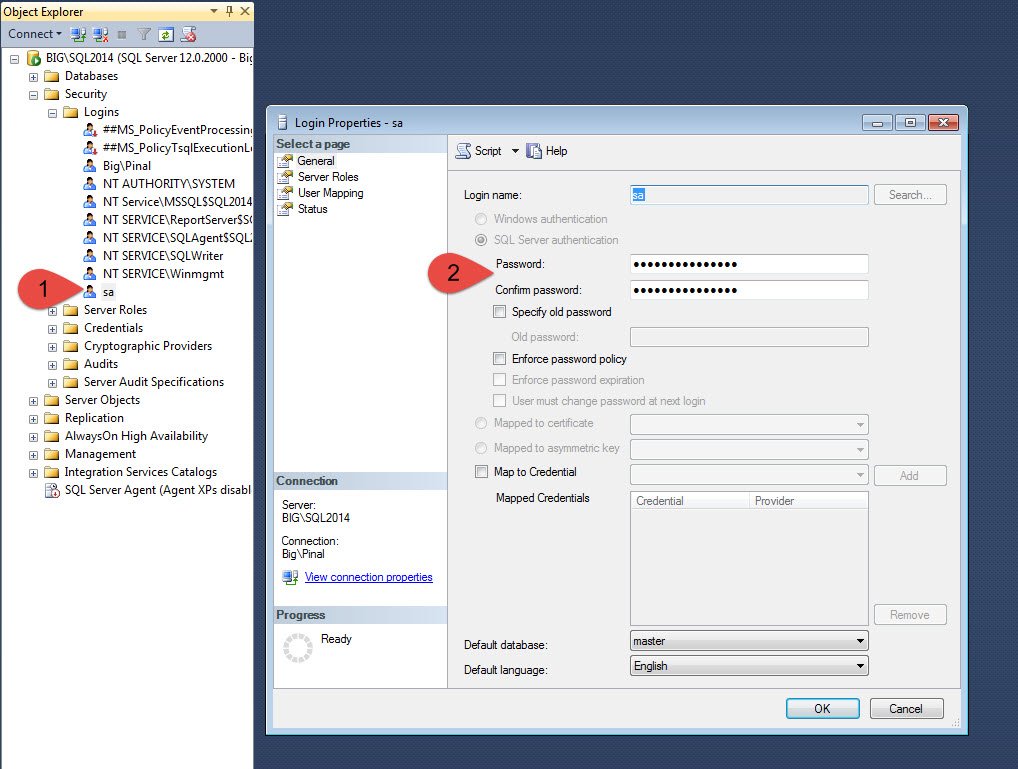
SQL in Sixty Seconds Video
I have attempted to explain the same subject in simple words over in following video.
Action Item
Here are the blog posts I have previously written on the subject of SA password. You can read it over here:
You can subscribe to my YouTube Channel for frequent updates.
Published by Pinal Dave on SQLAuthority. More of my work at pinaldave.com.
Discover more from SQL Authority with Pinal Dave
Subscribe to get the latest posts sent to your email.



3 Comments. Leave new
I like this. Simple solution for what at first might seem to be a scary problem. Thank you for that. Should be noted that you need to be an administrator to be able to do this. (I know, should go without saying, but still…)
I’m change the password, but there is a problem, which is that the password automatically changes every day
I do not know the reason for change
Please help me not to automatically change every day
you need to enable audit to find out who is changing password.