Cohort retention shows how many customers who started in the same month come back later. It answers a question the total customer count cannot: are people staying? Build it from first orders and month offsets, and the grid takes shape step by step.

Why the customer total can lie
Picture a dashboard where the customer count climbs every month. Everyone is happy. Then someone asks, “Are the people who joined in January still buying?” The total cannot tell you. New customers cover for the ones who left.
A cohort is a group that started together. Here a customer’s cohort is the month of their first order. If you care about signups instead, use signup dates. Pick the definition first, because the same word can describe two different groups of people.
Let me build it with five orders, so you can verify every number by eye.
DROP TABLE IF EXISTS #CohortOrders, #Cohorts, #Sizes, #Activity;

CREATE TABLE #CohortOrders (OrderId int PRIMARY KEY, CustomerId int, OrderDate date);
INSERT #CohortOrders VALUES
    (1, 1, '20260105'), (2, 1, '20260205'), (3, 1, '20260215'),
    (4, 2, '20260120'), (5, 3, '20260301');

SELECT * FROM #CohortOrders ORDER BY OrderId;
Customer 1 orders in January and twice in February. Customer 2 orders once in January. Customer 3 orders once in March.
Turn dates into month numbers
I need two things: the cohort month and the month offset. Offset 0 is the first-order month, offset 1 is the next month. DATEDIFF with month counts calendar boundaries crossed, not thirty-day periods.
SELECT DATEDIFF(month, '20260101', '20260131') AS WithinJanuary,
       DATEDIFF(month, '20260131', '20260201') AS OneDayApart;
The first value is 0, because both dates are in January. The second is 1, although the dates are one day apart, because they sit in different months. That is exactly what a month-based cohort wants.
Now find each customer’s cohort, and count how many customers each cohort has. The cutoff date, 1 May 2026, keeps later orders out.
DECLARE @AsOf date = '20260501';

SELECT CustomerId,
       DATEFROMPARTS(YEAR(MIN(OrderDate)), MONTH(MIN(OrderDate)), 1) AS Cohort
INTO #Cohorts
FROM #CohortOrders
WHERE OrderDate < @AsOf
GROUP BY CustomerId;

SELECT Cohort, COUNT(*) AS CohortSize
INTO #Sizes
FROM #Cohorts
GROUP BY Cohort;

SELECT Cohort, CohortSize FROM #Sizes ORDER BY Cohort;
January has two customers. March has one. Those sizes are the denominators for everything that follows.
Count customers, not orders
Next list which customers were active in which month offset. DISTINCT matters here. Customer 1 placed two orders in February, and that must count as one active customer, not two.
DECLARE @AsOf date = '20260501';

SELECT DISTINCT c.Cohort, c.CustomerId,
       DATEDIFF(month, c.Cohort, o.OrderDate) AS MonthOffset
INTO #Activity
FROM #Cohorts AS c
JOIN #CohortOrders AS o ON o.CustomerId = c.CustomerId
WHERE o.OrderDate < @AsOf;

SELECT * FROM #Activity ORDER BY Cohort, CustomerId, MonthOffset;
Customer 1 has two rows, offsets 0 and 1. Three orders became two activity rows. A prolific shopper does not turn into three people because the report is enthusiastic.
Build the grid and mind the cutoff
Now divide active customers by cohort size, for offsets 1 to 3. One more rule: a month that has not finished yet must show NULL, not 0. A zero means “nobody came back”. NULL means “we cannot know yet”.
DECLARE @AsOf date = '20260501';

WITH Counts AS
(
    SELECT Cohort, MonthOffset, COUNT(*) AS ActiveCustomers
    FROM #Activity
    GROUP BY Cohort, MonthOffset
), Grid AS
(
    SELECT s.Cohort, s.CohortSize, g.value AS MonthOffset,
           CASE WHEN DATEADD(month, g.value + 1, s.Cohort) <= @AsOf
                THEN CAST(100.0 * COALESCE(a.ActiveCustomers, 0) / s.CohortSize AS decimal(6, 2))
           END AS RetentionPercent
    FROM #Sizes AS s
    CROSS JOIN GENERATE_SERIES(1, 3) AS g
    LEFT JOIN Counts AS a ON a.Cohort = s.Cohort AND a.MonthOffset = g.value
)
SELECT Cohort, MAX(CohortSize) AS CohortSize,
       MAX(CASE WHEN MonthOffset = 1 THEN RetentionPercent END) AS Month1,
       MAX(CASE WHEN MonthOffset = 2 THEN RetentionPercent END) AS Month2,
       MAX(CASE WHEN MonthOffset = 3 THEN RetentionPercent END) AS Month3
FROM Grid
GROUP BY Cohort
ORDER BY Cohort;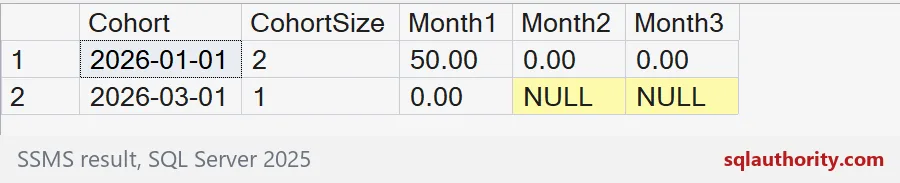
January has two customers and 50.00 percent in month 1: customer 1 came back, customer 2 did not. Months 2 and 3 are 0.00, which is a real zero because both months are complete. The March cohort shows 0.00 for month 1. Its months 2 and 3 are NULL, because May has not finished.

Trace one cohort by hand
Numbers in a grid earn trust when one row traces back to customers. Keep a drill-down query for the day someone asks, “Where does the 50 come from?”
SELECT c.CustomerId, o.OrderId, o.OrderDate,
       DATEDIFF(month, c.Cohort, o.OrderDate) AS MonthOffset
FROM #Cohorts AS c
JOIN #CohortOrders AS o ON o.CustomerId = c.CustomerId
WHERE c.Cohort = '20260101'
ORDER BY o.OrderId;

DROP TABLE IF EXISTS #CohortOrders, #Cohorts, #Sizes, #Activity;
The January cohort shows customer 1 with three orders at offsets 0, 1 and 1, and customer 2 with one order at offset 0. If a retention number moves, check whether the cohort definition changed before you explain it as customer behavior.
Keep the cohort definition next to the report, so the denominator stays easy to explain.
Retention is not the current customer total, it is continuing activity within a defined cohort.
Published by Pinal Dave on SQLAuthority. More of my work at pinaldave.com.
Discover more from SQL Authority with Pinal Dave
Subscribe to get the latest posts sent to your email.