
To get the second row from a table, first decide what second means. A table has no order of its own, so the answer depends on the ORDER BY clause you choose.

A Table Has No Second Row Until You Sort It
Ask for the second row without an ORDER BY clause and SQL Server can return any row it likes. Sorting fixes that, but ties bring the problem back. If two books cost the same, either one can come second. A tie breaker column, such as the primary key, gives the same answer every time.
The demo uses a table of eight books in a database named SecondRowDemo. Three books cost 18.00, so the ties are on purpose. Run the script on a test server.
IF DB_ID(N'SecondRowDemo') IS NULL CREATE DATABASE SecondRowDemo;
GO
USE SecondRowDemo;
GO
DROP TABLE IF EXISTS dbo.Books;
CREATE TABLE dbo.Books (
    BookID   int          NOT NULL PRIMARY KEY,
    Title    nvarchar(60) NOT NULL,
    Category nvarchar(30) NOT NULL,
    Price    decimal(6,2) NOT NULL
);
INSERT INTO dbo.Books (BookID, Title, Category, Price)
VALUES (1, N'Herb Garden Basics', N'Garden', 18.00),
       (2, N'Tea Around the World', N'Cooking', 24.50),
       (3, N'Bread From Scratch', N'Cooking', 22.00),
       (4, N'Window Box Gardening', N'Garden', 18.00),
       (5, N'Maps of the Pacific', N'Travel', 31.00),
       (6, N'Trail Notes', N'Travel', 16.50),
       (7, N'Spice Drawer', N'Cooking', 18.00),
       (8, N'Compost Made Easy', N'Garden', 14.00);
The whole post uses one order: price first, then BookID as the tie breaker. The list below shows it.
SELECT BookID, Title, Price
FROM dbo.Books
ORDER BY Price, BookID;
| BookID | Title | Price |
|---|---|---|
| 8 | Compost Made Easy | 14.00 |
| 6 | Trail Notes | 16.50 |
| 1 | Herb Garden Basics | 18.00 |
| 4 | Window Box Gardening | 18.00 |
| 7 | Spice Drawer | 18.00 |
| 3 | Bread From Scratch | 22.00 |
| 2 | Tea Around the World | 24.50 |
| 5 | Maps of the Pacific | 31.00 |
Get the Second Row With ROW_NUMBER
ROW_NUMBER numbers the rows in the order you give it. You can’t filter on that number in the same SELECT. So the numbering lives in a common table expression, a named query at the top of the statement. The outer query picks the rows by number. This example asks for rows 2, 4 and 7.
WITH Numbered AS (
    SELECT BookID, Title, Price,
           ROW_NUMBER() OVER (ORDER BY Price, BookID) AS RowNum
    FROM dbo.Books
)
SELECT RowNum, BookID, Title, Price
FROM Numbered
WHERE RowNum IN (2, 4, 7)
ORDER BY RowNum;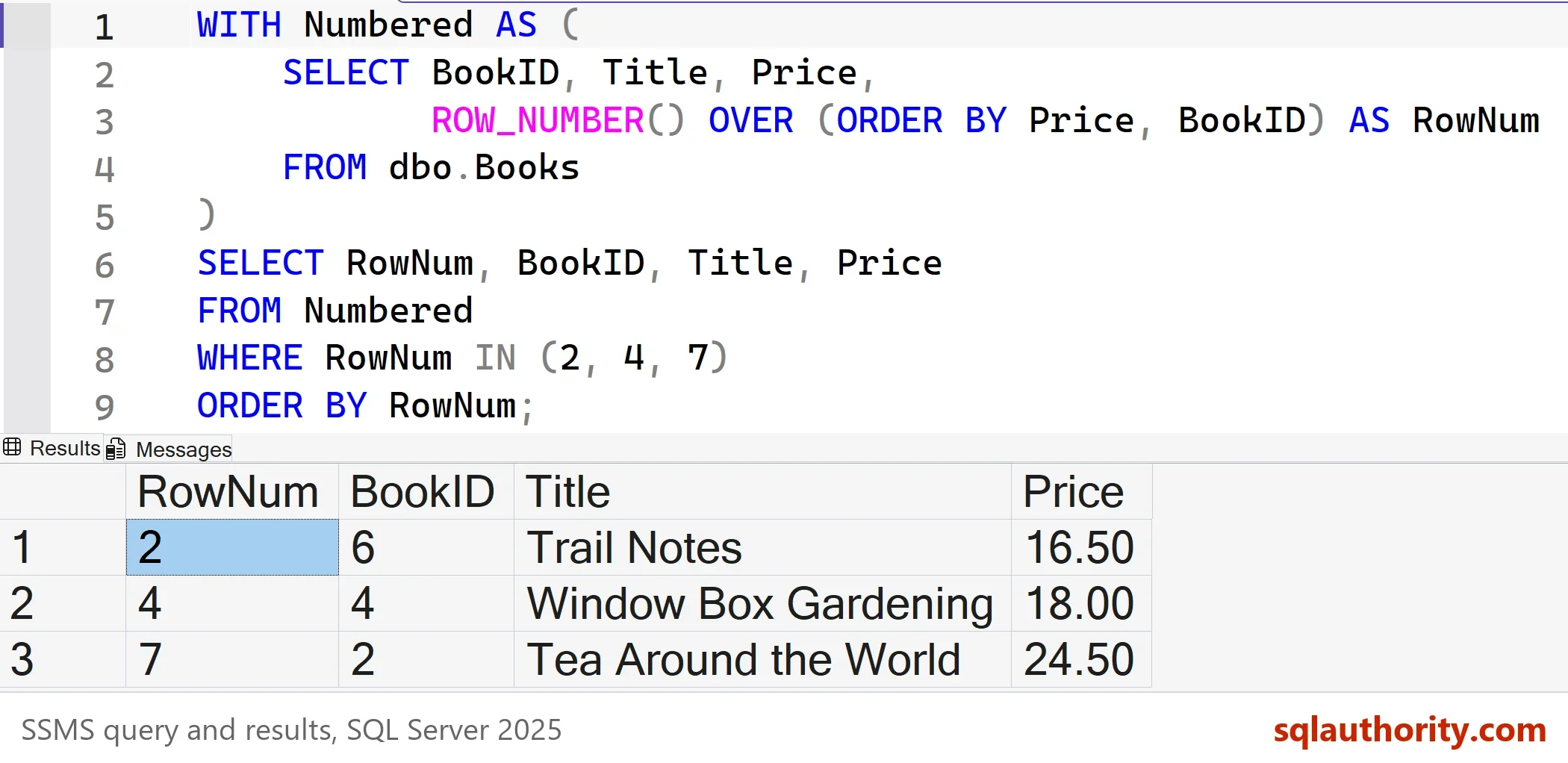
Change the numbers in the IN list to get any set of positions. This is the method I reach for first. It works for one row, for a list and for every second row. ROW_NUMBER needs SQL Server 2005 or later.
OFFSET and FETCH for One Row or a Range
SQL Server 2012 added OFFSET and FETCH. OFFSET 1 ROWS skips the first row, and FETCH NEXT 1 ROWS ONLY returns the next one. It is the shortest way to get the second row. The clause belongs to ORDER BY, so the query must have one. It returns one block of neighboring rows, so it can’t return rows 2, 4 and 7 in one pass.
SELECT BookID, Title, Price
FROM dbo.Books
ORDER BY Price, BookID
OFFSET 1 ROWS FETCH NEXT 1 ROWS ONLY;
| BookID | Title | Price |
|---|---|---|
| 6 | Trail Notes | 16.50 |
TOP Inside TOP for Old Versions
Before OFFSET existed, the usual trick was TOP inside TOP. The inner query takes the first two rows. The outer query sorts them in reverse and keeps one, which is the second row of the original order. It runs on any version, and the double ORDER BY is the price.
SELECT TOP (1) BookID, Title, Price
FROM (SELECT TOP (2) BookID, Title, Price
      FROM dbo.Books
      ORDER BY Price, BookID) AS FirstTwo
ORDER BY Price DESC, BookID DESC;
The result is the same row, Trail Notes. The outer ORDER BY reverses both columns. If you reverse only one, the tie breaker points the wrong way.
Every Second Row and the Second Row in Each Group
Two variations come up again and again. The remainder operator % gives every second row, because even numbers leave no remainder when divided by 2. PARTITION BY restarts the numbering in each group, so RowNum = 2 returns the second book in each category.
WITH Numbered AS (
    SELECT Title, Price,
           ROW_NUMBER() OVER (ORDER BY Price, BookID) AS RowNum
    FROM dbo.Books
)
SELECT RowNum, Title, Price
FROM Numbered
WHERE RowNum % 2 = 0
ORDER BY RowNum;

WITH Ranked AS (
    SELECT Category, Title, Price,
           ROW_NUMBER() OVER (PARTITION BY Category ORDER BY Price, BookID) AS RowNum
    FROM dbo.Books
)
SELECT Category, Title, Price
FROM Ranked
WHERE RowNum = 2
ORDER BY Category;| RowNum | Title | Price |
|---|---|---|
| 2 | Trail Notes | 16.50 |
| 4 | Window Box Gardening | 18.00 |
| 6 | Bread From Scratch | 22.00 |
| 8 | Maps of the Pacific | 31.00 |
| Category | Title | Price |
|---|---|---|
| Cooking | Bread From Scratch | 22.00 |
| Garden | Herb Garden Basics | 18.00 |
| Travel | Maps of the Pacific | 31.00 |
Second Row or Second Value? Mind the Ties
ROW_NUMBER never repeats a number, so there’s always exactly one second row. RANK and DENSE_RANK give tied rows the same number. They answer another question: which is the second price, not which is the second row. The next query puts all three side by side.
SELECT Title, Price,
       ROW_NUMBER() OVER (ORDER BY Price, BookID) AS RowNum,
       RANK()       OVER (ORDER BY Price)         AS Rnk,
       DENSE_RANK() OVER (ORDER BY Price)         AS DenseRnk
FROM dbo.Books
ORDER BY Price, BookID;| Title | Price | RowNum | Rnk | DenseRnk |
|---|---|---|---|---|
| Compost Made Easy | 14.00 | 1 | 1 | 1 |
| Trail Notes | 16.50 | 2 | 2 | 2 |
| Herb Garden Basics | 18.00 | 3 | 3 | 3 |
| Window Box Gardening | 18.00 | 4 | 3 | 3 |
| Spice Drawer | 18.00 | 5 | 3 | 3 |
| Bread From Scratch | 22.00 | 6 | 6 | 4 |
| Tea Around the World | 24.50 | 7 | 7 | 5 |
| Maps of the Pacific | 31.00 | 8 | 8 | 6 |
Ask for the fourth row and ROW_NUMBER returns Window Box Gardening. RANK = 4 returns nothing, because the rank jumps from 3 to 6. DENSE_RANK = 4 returns Bread From Scratch, the fourth price. Decide which question you’re asking before you pick the function.
Which Method Reads Less?
A second row should be cheap to find. The next script builds a table of 200,000 rows and runs four methods with SET STATISTICS IO ON. It also runs the older temp table method. That method copies every row into a temporary table and then reads the second row from the copy.
DROP TABLE IF EXISTS dbo.BigBooks;
CREATE TABLE dbo.BigBooks (BookID int NOT NULL PRIMARY KEY, Title nvarchar(60) NOT NULL);
INSERT INTO dbo.BigBooks (BookID, Title)
SELECT n, N'Title ' + CONVERT(nvarchar(10), n)
FROM (SELECT TOP (200000) ROW_NUMBER() OVER (ORDER BY (SELECT NULL)) AS n
      FROM sys.all_objects AS a CROSS JOIN sys.all_objects AS b) AS x;
GO
SET STATISTICS IO ON;
GO
SELECT BookID, Title FROM dbo.BigBooks ORDER BY BookID OFFSET 1 ROWS FETCH NEXT 1 ROWS ONLY;
GO
SELECT TOP (1) BookID, Title FROM (SELECT TOP (2) BookID, Title FROM dbo.BigBooks ORDER BY BookID) AS t ORDER BY BookID DESC;
GO
WITH Numbered AS (SELECT BookID, Title, ROW_NUMBER() OVER (ORDER BY BookID) AS RowNum FROM dbo.BigBooks)
SELECT BookID, Title FROM Numbered WHERE RowNum = 2;
GO
WITH Numbered AS (SELECT BookID, Title, ROW_NUMBER() OVER (ORDER BY BookID) AS RowNum FROM dbo.BigBooks)
SELECT BookID, Title FROM Numbered WHERE RowNum IN (2, 4, 7);
GO
CREATE TABLE #Copy (ID int IDENTITY, BookID int, Title nvarchar(60));
INSERT INTO #Copy (BookID, Title) SELECT BookID, Title FROM dbo.BigBooks ORDER BY BookID;
SELECT BookID, Title FROM #Copy WHERE ID = 2;
GO
SET STATISTICS IO OFF;
DROP TABLE #Copy;| Method | Logical reads |
|---|---|
| OFFSET and FETCH | 3 |
| TOP inside TOP | 3 |
| ROW_NUMBER, row 2 | 18 |
| ROW_NUMBER, rows 2, 4 and 7 | 18 |
| Temp table copy | 993 on BigBooks to fill it, 1,088 on the copy |
OFFSET and TOP inside TOP stop after two rows. ROW_NUMBER reads a few more pages. The temp table method copies all 200,000 rows to read one of them. Your reads can differ by a page or two, and the gap stays.
Is the Temp Table Method Wrong?
You could argue that the temp table method is easier to read, because the numbers are plain data. It is. It also costs a full copy of the result on every call. A TOP (7) in the copy shrinks the cost, but the table is still built for one answer. On a table of eight rows nobody notices. On 200,000 rows the extra reads add up.
What to Remember
To get the second row reliably, sort before you count. Add a tie breaker, so the second row is the same on every run. Use ROW_NUMBER when you need several positions, every second row or the second row in each group. Use OFFSET and FETCH for one row or a range. Use TOP inside TOP on a server older than 2012.
Reach for RANK or DENSE_RANK only when you want the second value instead of the second row. When you finish with the demo, run the cleanup script.
USE master;
GO
ALTER DATABASE SecondRowDemo SET SINGLE_USER WITH ROLLBACK IMMEDIATE;
DROP DATABASE SecondRowDemo;
The second row is not a place in the table, it is a place in the order you chose.
Published by Pinal Dave on SQLAuthority. More of my work at pinaldave.com.
Discover more from SQL Authority with Pinal Dave
Subscribe to get the latest posts sent to your email.




10 Comments. Leave new
You could get better performance from the first query if you selected TOP(7) like this:
REATE TABLE #TempTable (ID INT IDENTITY,
OrderLineID INT, OrderID INT, StockItemID INT, Description VARCHAR(200))
GO
INSERT INTO #TempTable
SELECT TOP(7) OrderLineID, OrderID, StockItemID, Description
FROM WideWorldImporters.Sales.OrderLines
ORDER BY OrderID, StockItemID
GO
SELECT OrderLineID, OrderID, StockItemID, Description
FROM #TempTable
WHERE ID IN (2,4,7)
GO
DROP TABLE #TempTable
GO
Why not use something like OFFSET and Fetch:
CREATE TABLE #tbl (someNumber INT)
INSERT INTO #tbl VALUES (1)
INSERT INTO #tbl VALUES (2)
INSERT INTO #tbl VALUES (3)
SELECT someNumber FROM #tbl ORDER BY someNumber
OFFSET 1 ROWS FETCH NEXT 1 ROWS ONLY;
DROP TABLE #tbl
Totally!
SELECT * FROM Customers WHERE ROWNUM = 3;
This is to retrieve 3rd row in SQL.
Where did you use RowNum as the alias? I see T..
Also doesn’t SQL have a function RANK() ?
Rank will not work as we need only rows. Rank will give a very different results if there is tie in the columns used in the where ORDER BY clause.
In short, “how to retrieve every second row from a table”
We can achieve this by the following query too:
SELECT
FROM (
SELECT ROW_NUMBER() OVER (ORDER BY OrderID, StockItemID) AS RowNum,
OrderLineID, OrderID, StockItemID, Description
FROM WideWorldImporters.Sales.OrderLines
) T
WHERE RowNum % 2 = 0
GO
In the above query, we perform the remainder on RowNum by 2.
Hope this helps.
Thanks.
Your example has #temp table and sub query but with rank functions CTE is works good rite ?
?
I am looking for 2 rows out of multi rows, from all groups of rows. I do not know in each group what row number I need. To me that is ludicrous. I want first row ID# = SPID# and TR# = 202220 and (I just need to know if the next record exist) ID# = SPID# and TR# = 202227. If these two rows are in the same table then I want a a row on the report.