
The UNION operator removes duplicates from a query result without deleting source rows. I use a small example to show that distinction.

DECLARE @DuplicateRecordTable TABLE (Col1 int, Col2 int);
INSERT @DuplicateRecordTable VALUES (1,1),(1,1),(1,1),(1,2),(1,2),(1,3),(1,4);
SELECT Col1, Col2 FROM @DuplicateRecordTable;
SELECT Col1, Col2 FROM @DuplicateRecordTable
UNION
SELECT Col1, Col2 FROM @DuplicateRecordTable WHERE 1 = 0;
SELECT COUNT(*) AS SourceRowsStillPresent FROM @DuplicateRecordTable;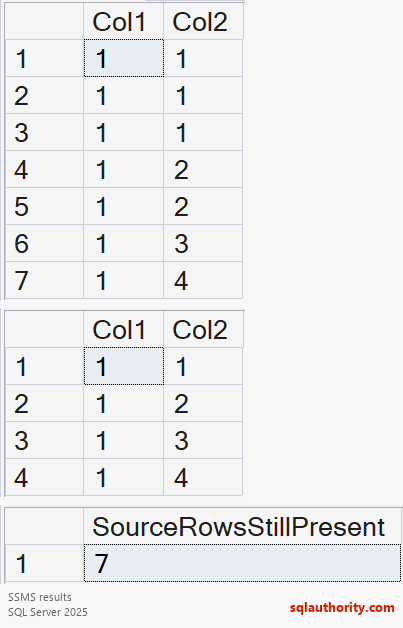

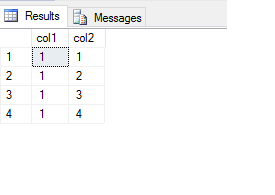
The second SELECT returns no rows. UNION applies distinctness across the selected columns. The result contains (1,1), (1,2), (1,3) and (1,4). The source count remains seven.
SELECT DISTINCT Col1, Col2 expresses this requirement more directly. UNION ALL retains duplicates. Neither guarantees output order without ORDER BY. Equality follows the result data types and collation.
Keep the original delete-duplicates article for the different task of modifying stored rows. Choose which row to retain and test that operation separately.
Related reading
Result deduplication is not deletion of stored duplicates, it is a transformation of query output.
Published by Pinal Dave on SQLAuthority. More of my work at pinaldave.com.
Discover more from SQL Authority with Pinal Dave
Subscribe to get the latest posts sent to your email.




16 Comments. Leave new
Hi Pinal
Please change Union all to Union.Becoz Union all will not eliminate duplicate rows. UNION statement effectively does a SELECT DISTINCT on the results set.
Isn’t a distinct or a group by more obvious? E.g.
SELECT col1, col2
FROM DuplicateRcordTable
GROUP BY col1, col2
or
SELECT DISTINCT col1, col2
FROM DuplicateRcordTable
I think the last script is:
SELECT col1,col2
FROM DuplicateRcordTable
UNION /* ALL */
SELECT col1,col2
FROM DuplicateRcordTable WHERE 1=0
hi,
IMHO, you should omit ALL from UNION in the 2nd sql
SELECT col1,col2
FROM DuplicateRcordTable
UNION ALL <-
SELECT col1,col2
FROM DuplicateRcordTable WHERE 1=0
thx
jim
Hi All, I fixed the typo where I had incorrectly had UNION ALL instead of UNION… thanks for bringing it to my attention. Thanks so much!
Do the different ways of deduplicating (Distinct, Group By, Union) result in different execution plans (performance)? If not, DISTINCT is the “shortest” script to write -> and to maintain
Hi Pinal,
The query used in the example only retrieves the unique records, but not delete the duplicate rows from the table. Your previous blog on removing duplicate rows using ROW_NUMBER() with CTE actually removes the duplicates from the table. I am expecting the same type of behavior when I saw the blog but it is not the case.
Thanks,
Srinivas
Exactly. I too thought you would be removing duplicates, as that is the title of the blog.
Hi Pinal,
We can use UNION and top 0 to achieve the same result.
SELECT col1,col2
FROM DuplicateRcordTable
UNION
SELECT top 0 col1,col2
FROM DuplicateRcordTable
I have applied this from one of your recent blogs on “Which is better in terms of performance WHERE 1 = 2 or top 0 ” :)
Although the same can be achieved multiple ways as suggested by other blog readers.
Thanks,
Srini
I use ctid along with where condition..
Hi Babu KM,
Can you please share your query? I am not clear what you are using in your WHERE clause.
Thanks,
Srini
Hi Pinal,
Thanks for this post.
Intersect has also same property to remove duplicate records.
As it is retrieving common records between Table A and Table B, but it will be unique.
Thanks
Vaibhav
Select * from DuplicateRcordTable
Union
Select * from DuplicateRcordTable
Why the condition 1=0??
The condition is to prevent any rows from being returned from the second query in the union. WHERE 1=0 always means false, so no rows are returned.
will the result change if i remove where 1=0?
I do not understand why do we need to union an empty set? How does a UNION operator work.
Does it remove the duplicates from the resulting combined table or does it pick a row from table A compares it with all rows in Table B and if it is not the duplicate (same as in table b) populates it in the result set.
UNION will combine the result sets and find out DISTINCT data. So you do not need anything from the same table from the second select statement and that’s why WHERE 1=0 is used. It is faster than bringing out all rows from the same table