
A SELECT COUNT without FROM doesn’t fail, it returns 1. That surprises most people the first time. The query runs, the grid shows a number, and nothing warns you that the table was never read.

What Happens With COUNT Without FROM
T-SQL lets a SELECT run without a FROM clause. SELECT 1 works for the same reason. An aggregate over that single implicit row counts one row. An aggregate with no GROUP BY always returns exactly one row, even when its input is empty. The demo needs a small table first. It is a plant shop with three plants, and the setup script can run twice.
IF DB_ID(N'CountFromDemo') IS NULL CREATE DATABASE CountFromDemo;
GO
USE CountFromDemo;
GO
DROP TABLE IF EXISTS dbo.Plants;
CREATE TABLE dbo.Plants (
    PlantID   int          NOT NULL PRIMARY KEY,
    PlantName nvarchar(40) NOT NULL,
    Light     nvarchar(10) NOT NULL,
    StockQty  int          NOT NULL
);
INSERT INTO dbo.Plants (PlantID, PlantName, Light, StockQty)
VALUES (1, N'Basil', N'Sun', 40),
       (2, N'Mint', N'Shade', 12),
       (3, N'Thyme', N'Sun', 0);
The correct query returns 3.
SELECT COUNT(*) FROM dbo.Plants;
Now forget the word FROM and keep the table name.
SELECT COUNT(*) Plants;
| Plants |
|---|
| 1 |
The result is 1, and the column is named Plants. In T-SQL the AS keyword is optional in a column alias. So the name you meant as a table became the label of the answer. The query never touched dbo.Plants.
Why a Schema Name Changes the Result
Write the table the way most teams do, with its schema, and you get an error.
SELECT COUNT(*) dbo.Plants;
Msg 102, Level 15, State 1, Line 1
Incorrect syntax near '.'.
An alias can’t contain a dot, so the parser stops. The error is accidental protection. A temp table such as #customers or an unqualified name has no dot, so it slips through as an alias. Two more variations are worth knowing. SELECT COUNT(*) WHERE 1 = 0 returns 0, because the filter removes the one implicit row. And SELECT COUNT(Light) Plants fails with Msg 207, because a named column needs a table to read from. Only COUNT(*) and constants can run without one.
The Same Habit Hides Other Mistakes
A missing FROM isn’t the only silent slip. A missing comma between two columns does the same thing, because the second name becomes an alias.
SELECT PlantName Light FROM dbo.Plants;
| Light |
|---|
| Basil |
| Mint |
| Thyme |
The grid has one column, named Light, and it holds plant names. The Light values were never selected. You can only spot this by reading the headers.
The next one is harder to see. A subquery can borrow a column from the outer query. The table dbo.Discontinued below has a SKU column but no PlantID column.
DROP TABLE IF EXISTS dbo.Discontinued;
CREATE TABLE dbo.Discontinued (SKU int NOT NULL, Reason nvarchar(40) NOT NULL);
INSERT INTO dbo.Discontinued (SKU, Reason) VALUES (900, N'Frost damage');
The query below was meant to list the discontinued plants. It returns all three.
SELECT PlantName FROM dbo.Plants
WHERE PlantID IN (SELECT PlantID FROM dbo.Discontinued);
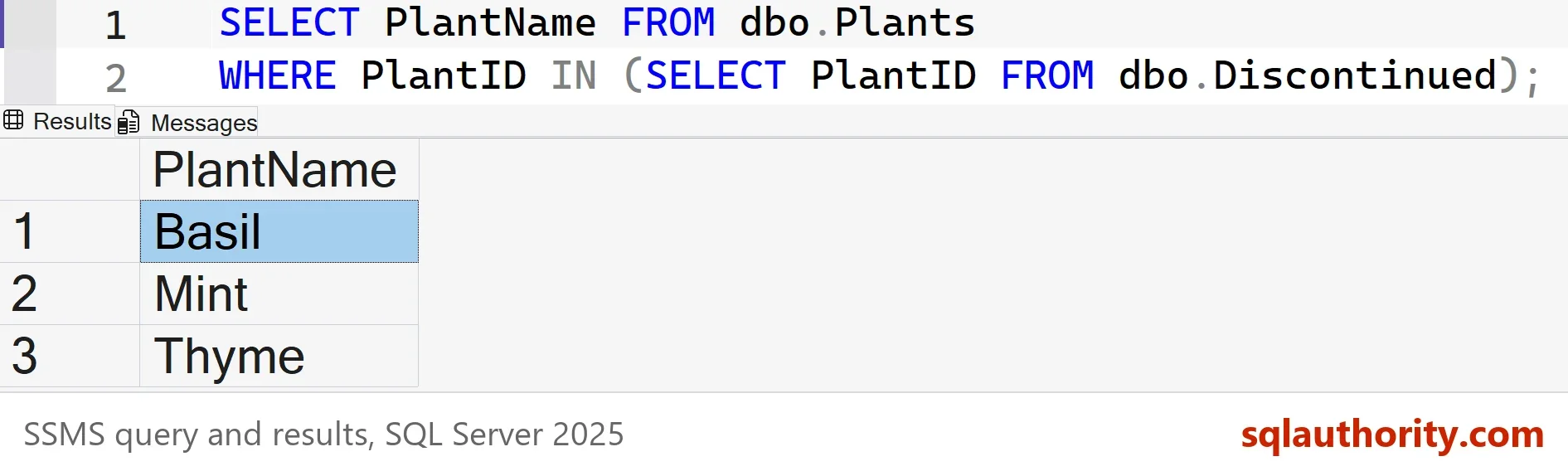
SQL Server looks for PlantID in dbo.Discontinued first. It isn’t there, so the name resolves to the outer table. The condition then compares each plant with itself. It is true for every plant, as long as dbo.Discontinued holds a row. Prefix every column with a table alias and the same mistake becomes an error.
SELECT PlantName FROM dbo.Plants
WHERE PlantID IN (SELECT d.PlantID FROM dbo.Discontinued AS d);
Msg 207, Level 16, State 1, Line 2
Invalid column name 'PlantID'.
Counting by Condition in One Pass
The person who writes this typo wants several counts at once. One scan can do that. COUNT ignores NULL, and a CASE without an ELSE returns NULL, so each count sees only the rows that match. SUM over IIF does the same with ones and zeros. Repeat the COUNT(CASE ...) once per condition in the same SELECT, and one scan returns every count. T-SQL has no IF() function, so use IIF (SQL Server 2012 and later) or CASE.
SELECT SUM(IIF(Light = N'Sun', 1, 0)) AS SunnyPlants,
       COUNT(CASE WHEN StockQty = 0 THEN 1 END) AS OutOfStock
FROM dbo.Plants;| SunnyPlants | OutOfStock |
|---|---|
| 2 | 1 |
You could argue that a COUNT without FROM is a feature, since the language allows a SELECT with no table. It is legal, and it’s useful for SELECT SYSDATETIME(). The trouble is that a legal query and a correct query look identical in the grid.
How to Catch It Before It Ships
Parsing a query in SSMS checks syntax only, and every query above is valid syntax. So the check has to be a habit. Compare each new count with a number you trust, such as the source row count after a load. Read the column header before you read the value. If a query has a header that looks like a table name, it is an alias.
A code review helps too. A COUNT without FROM is easy to spot once you know the pattern. A bare table name sits right after the closing bracket of an aggregate.
What to Remember
Write AS before every column alias, so a stray word can’t turn into one by accident. Qualify every column with a table alias, so a missing column fails loudly. Before trusting a count, check that the header says what you expect. A header named after a table is a sign that something went wrong. A COUNT without FROM always looks like that.
In my reviews, I look first at a COUNT that returns 1 on a table with thousands of rows. Run the cleanup script when you finish.
USE master;
GO
IF DB_ID(N'CountFromDemo') IS NOT NULL
BEGIN
    ALTER DATABASE CountFromDemo SET SINGLE_USER WITH ROLLBACK IMMEDIATE;
    DROP DATABASE CountFromDemo;
END;
A silent query is not a correct query, it is one that hasn’t failed yet.
Published by Pinal Dave on SQLAuthority. More of my work at pinaldave.com.
Discover more from SQL Authority with Pinal Dave
Subscribe to get the latest posts sent to your email.




5 Comments. Leave new
Its possible count for Multiples where statements?
Where custumersID > 100 and custumersName like ‘john’
Exemplo of Result
custumersID | custumersName
3000 | 4300
For that use SUM and IF:
SUM(IF col1=testval1, 1, 0) AS CountTest1
Also try using a non-existent column name in the WHERE clause. Yet another reason to always include the table name (or alias) and not just the column name by itself.
I have to filter 800 columns.
the objective is to count the amount of registration that each of the clauses where would have, being regressive to each column.
The query below shows the complexity error, with the last line having all the previous ones.
Some other solution to count the items that are filtered.
==================
Declare @Maior int, @Menor int
Set @Maior=3
Set @Menor=2
Select Count(*) As TotalCount,
Count(Case When A.[BZ] > (B.[BZ] – (C.[BZ] * @Menor) ) and A.[BZ] (B.[BZ] – (C.[BZ] * @Menor) ) and A.[BZ] (B.[CA] – (C.[CA] * @Menor) ) and A.[CA] (B.[BZ] – (C.[BZ] * @Menor) ) and A.[BZ] (B.[CA] – (C.[CA] * @Menor) ) and A.[CA] (B.[CB] – (C.[CB] * @Menor) ) and A.[CB] < (B.[CB] + (C.[CB] * @Maior) ) Then 1 End) As CountAfterCA,
'– etc AHZ
from [Quality] as A , [Q _media] as B , [Q_desvio] as C
=================
Correct query
Declare @Maior int, @Menor int
Set @Maior=3
Set @Menor=2
Select Count(*) As TotalCount,
Count(Case When A.[BZ] > (B.[BZ] – (C.[BZ] * @Menor) ) and A.[BZ] (B.[BZ] – (C.[BZ] * @Menor) ) and A.[BZ] (B.[CA] – (C.[CA] * @Menor) ) and A.[CA] (B.[BZ] – (C.[BZ] * @Menor) ) and A.[BZ] (B.[CA] – (C.[CA] * @Menor) ) and A.[CA] (B.[CB] – (C.[CB] * @Menor) ) and A.[CB] < (B.[CB] + (C.[CB] * @Maior) ) Then 1 End) As CountAfterCA,
— etc
from [Quality] as A , [Q _media] as B , [Q_desvio] as C