
Question: What is a copy-only backup in SQL Server?
Answer: It is an extra backup you can take without changing the normal backup sequence. For a copy-only full backup, the practical point is that it does not become the base for later differential backups. I used to describe this as not breaking the backup LSN chain, but that wording mixes two different ideas. An ordinary extra full backup changes the differential base; it does not break the transaction log backup chain.

The midnight, 10 AM, and 2 PM example
Suppose your scheduled full backup runs at midnight, and differential backups run during the day. To restore the 2 PM differential, you first need the full backup on which that differential is based.
Now someone takes an extra full backup at 10 AM. If it is a regular full, the later 2 PM differential is based on the 10 AM full. A restore process that still expects the midnight full as the differential base will fail. If the 10 AM backup is copy-only, the 2 PM differential still uses midnight as its base. The extra copy is available for its own purpose without redirecting the scheduled differential workflow.
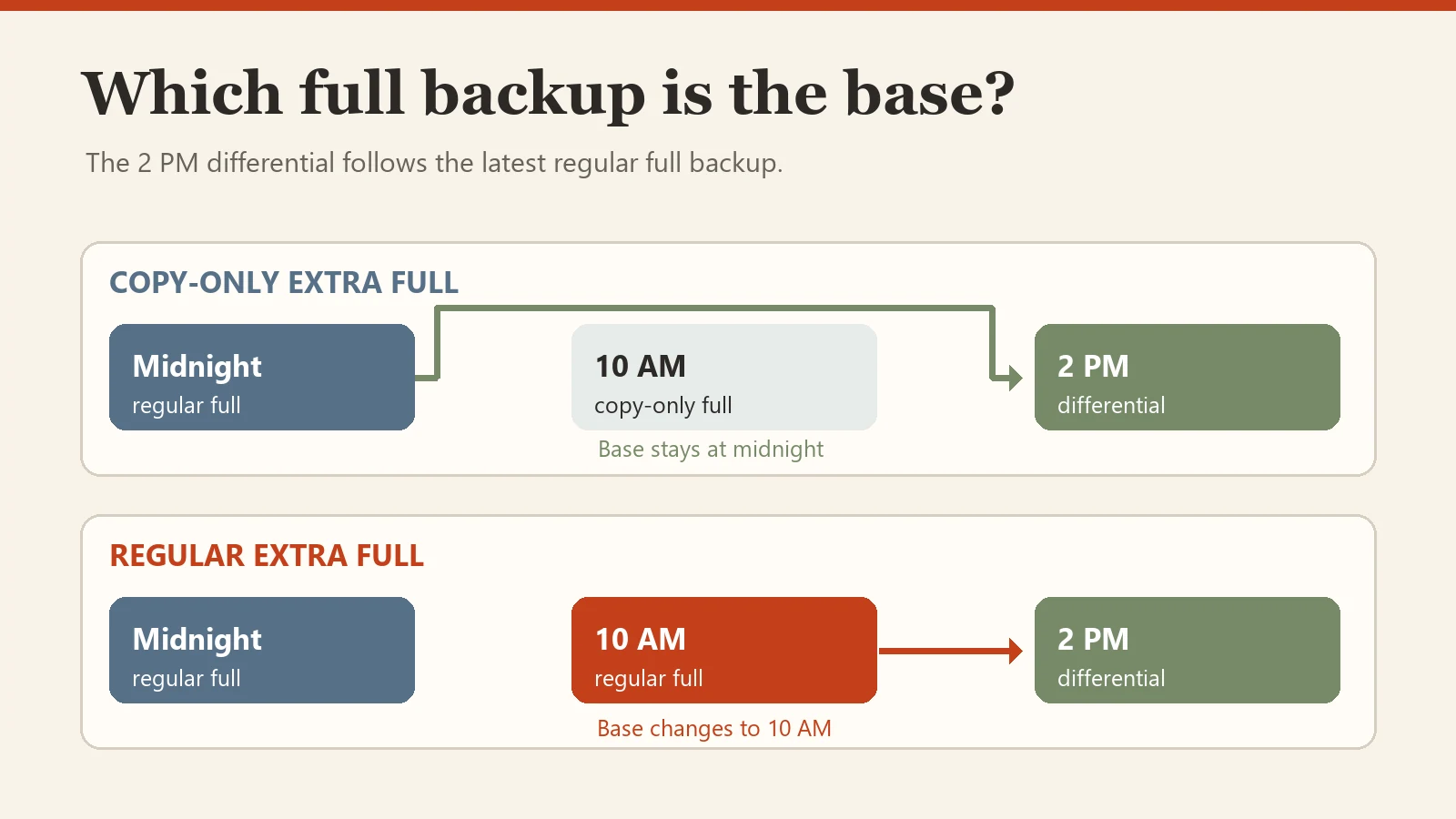
That distinction is the heart of the original diagrams. The comparison here keeps both paths in one readable view. It also avoids suggesting that a regular full backup destroys the log backup chain. Those log backups remain part of their own restore sequence. A differential restores after its full base; it does not require every earlier differential. The old diagrams used connecting arrows as workflow chronology, which could obscure that important distinction.
Take the extra full backup
Replace the database name and path with ones approved for your server. Create the folder first and ensure the SQL Server service account can write to it. Use a unique filename so this extra copy does not overwrite a scheduled backup.
BACKUP DATABASE [YourDatabase]
TO DISK = N'C:\SqlBackups\YourDatabase-copy-only.bak'
WITH COPY_ONLY, CHECKSUM;
The interview answer is therefore short: a copy-only full is a standalone extra full that does not reset the differential base. If you are planning a restore, inspect the backup metadata and use the full backup that actually belongs with the differential. For the broader restore sequence, see my earlier backup timeline explanation.
Published by Pinal Dave on SQLAuthority. More of my work at pinaldave.com.



7 Comments. Leave new
Hi Pinal,
Does your explanation also hold if my backup starategy only has full backups at night and hourly log backups instead of differential backups?
1. If your backup policy doesn’t have differential backups in the schedule, you are not required to specify “copy-only” while taking an adhoc full backup. A full backup (with or without copy-only) never breaks the LSN chain of the log backups. It only resets the differential base.
2. Obviously, if you want an adhoc log backup, you will have to specify copy-only in the log backup command. Otherwise, you’ll break the log chain.
Hope this helps.
You have cleared me on log backup.lthank you
Hi Pinal,
This is a very good illustration! Thank you!!
To tell the truth, I never even looked at that before. Has that been in SQL Server for a long time?
Very good explanation.. Thank you so much….
This type of backup is useful when you want to natively backup and restore a primary DB on a dev environment or as a secondary replica without interfering with the backup chain managed by a 3rd party solution such as NetApp SnapCenter.