TRIGGER_NESTLEVEL lets a trigger notice that it is calling itself and stop. A single check at the top is enough to turn an endless loop into one extra pass.

The trigger that updates its own table
Here is a classic. You want a TouchedAt column that records when a row changed. So you write an AFTER UPDATE trigger that sets TouchedAt. But that trigger updates the same table. An update inside a trigger can fire the trigger again.
Most of the time nothing bad happens, because SQL Server ships with recursive triggers turned off. Then one day someone switches the setting on for another reason. The nightly update job starts failing at 2 AM, and nobody touched the trigger. Let me show you how that looks.
Set up the demo
The demo creates a database called SqlAuthorityDemo, switches recursive triggers on, and builds a two row table. It drops the database at the end. The first result shows the setting on a brand new database.
USE master;
DROP DATABASE IF EXISTS SqlAuthorityDemo;
GO
CREATE DATABASE SqlAuthorityDemo;
GO
USE SqlAuthorityDemo;
GO
SELECT is_recursive_triggers_on AS NewDatabaseSetting
FROM sys.databases
WHERE name = N'SqlAuthorityDemo';

ALTER DATABASE SqlAuthorityDemo SET RECURSIVE_TRIGGERS ON;

CREATE TABLE dbo.StampedItem (
    Id          int PRIMARY KEY,
    ValueNumber int,
    TouchedAt   datetime2 NULL
);
INSERT dbo.StampedItem VALUES (1, 10, NULL), (2, 20, NULL);
A new database reports 0, so recursion is off by default. We just turned it on for this database only.
Watch the unguarded trigger fail
Now a trigger with no guard. It stamps the rows touched by the update.
CREATE TRIGGER dbo.StampedItemTrigger ON dbo.StampedItem AFTER UPDATE
AS
BEGIN
    SET NOCOUNT ON;
    UPDATE s SET TouchedAt = SYSUTCDATETIME()
    FROM dbo.StampedItem AS s
    JOIN inserted AS i ON i.Id = s.Id;
END;
Run an ordinary update.
UPDATE dbo.StampedItem SET ValueNumber = ValueNumber + 1;It fails with error 217, which says the maximum nesting level of 32 was exceeded. Each stamp update fired the trigger again, and again, until SQL Server pulled the plug. The whole statement rolled back, so the value change was lost too. That is why a harmless looking audit trigger can break a business update.
Add a guard with TRIGGER_NESTLEVEL
The fix is two lines. Ask for the nest level of this trigger by name, and return if it is above 1. I also print the depth so you can see it.
CREATE OR ALTER TRIGGER dbo.StampedItemTrigger ON dbo.StampedItem AFTER UPDATE
AS
BEGIN
    SET NOCOUNT ON;
    DECLARE @depth int = TRIGGER_NESTLEVEL(OBJECT_ID(N'dbo.StampedItemTrigger'));
    SELECT @depth AS ThisTriggerDepth;
    IF @depth > 1 RETURN;

    UPDATE s SET TouchedAt = SYSUTCDATETIME()
    FROM dbo.StampedItem AS s
    JOIN inserted AS i ON i.Id = s.Id;
END;
Naming the trigger matters. With its object ID, the check looks at this trigger’s own depth. That keeps the guard narrow, so it only stops this trigger from repeating itself.
Now run the same update again and read the results.
UPDATE dbo.StampedItem SET ValueNumber = ValueNumber + 1;

SELECT Id, ValueNumber,
       CASE WHEN TouchedAt IS NULL THEN 0 ELSE 1 END AS HasTimestamp
FROM dbo.StampedItem
ORDER BY Id;

SELECT TRIGGER_NESTLEVEL() AS OutsideDepth;

SELECT is_recursive_triggers_on
FROM sys.databases
WHERE name = N'SqlAuthorityDemo';
The trigger printed depth 1, then depth 2. The second call hit the guard and returned before it could update again. Rows 1 and 2 now have values 11 and 21, and both have HasTimestamp 1. Outside any trigger the depth is 0, and the database setting is still on. The guard worked while recursion was fully enabled.

What happens with recursion off
Switch the setting back off and check it.
ALTER DATABASE SqlAuthorityDemo SET RECURSIVE_TRIGGERS OFF;

SELECT is_recursive_triggers_on AS RestoredRecursiveSetting
FROM sys.databases
WHERE name = N'SqlAuthorityDemo';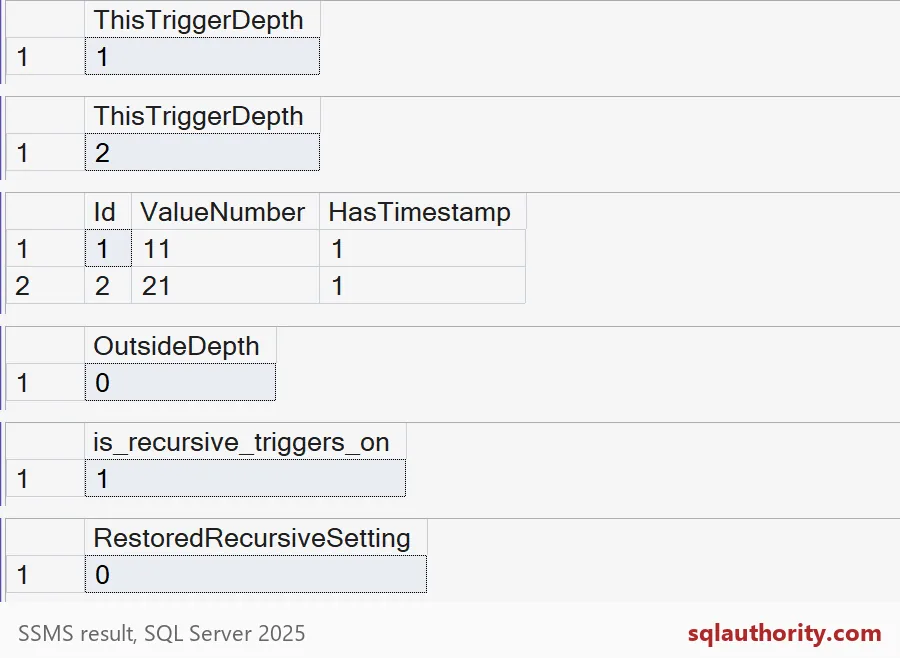
The setting reads 0 again. Run one more update to see the difference.
UPDATE dbo.StampedItem SET ValueNumber = ValueNumber + 1;This time the trigger reports depth 1 only. SQL Server never calls it a second time, so the guard has nothing to do. It stays in the trigger anyway. The setting belongs to the database, and the next person to change it should not break your update job. Keep in mind that the guard covers only this one trigger. Chains across other tables need their own look.
Here is the cleanup, which drops the demo database.
USE master;
DROP DATABASE IF EXISTS SqlAuthorityDemo;
The demo prints error 217 once, on purpose.
Put the guard in the trigger today, and the setting stops being a surprise.
TRIGGER_NESTLEVEL is not a ban on nesting, it is a boundary for one trigger.
Published by Pinal Dave on SQLAuthority. More of my work at pinaldave.com.
Discover more from SQL Authority with Pinal Dave
Subscribe to get the latest posts sent to your email.