
This Alternate to AGENT_DATETIME converts integer date and time values without calling an msdb function. I preserve leading zeros in the time.

A reader questioned permissions for the msdb-only AGENT_DATETIME function. That prompted an alternative using the supplied date and time integers. I keep the conversion independent of that helper.
DECLARE @Date int = 20150119, @Time int = 171911;
DECLARE @TimeText char(6) = RIGHT('000000' + CONVERT(varchar(6), @Time), 6);
SELECT TRY_CONVERT(datetime2(0),
    CONVERT(char(8), @Date) + ' ' +
    STUFF(STUFF(@TimeText, 3, 0, ':'), 6, 0, ':'), 112) AS EventDateTime;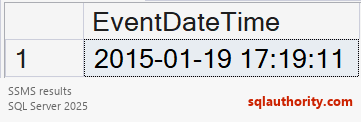
For the original inputs, the expected value is 2015-01-19 17:19:11. The date integer is in yyyymmdd format and the time integer is in hhmmss format. Padding the time to six characters matters: an integer such as 911 loses its leading zeros but still means 00:09:11.
TRY_CONVERT requires SQL Server 2012 or later. Validate an eight-digit date and a nonnegative time no greater than 235959. Conversion also checks the hour, minute and second values. Investigate NULL instead of treating it as a real job run.
My older CAST/STUFF expression omitted explicit zero padding. It handled the six-digit example but not every shorter time. Agent run_duration is elapsed duration and can exceed 24 hours. Don’t decode it as a clock time.
Reference: TRY_CONVERT.
Related reading
An Agent duration is not a clock time, it is elapsed time that needs a different conversion.
Published by Pinal Dave on SQLAuthority. More of my work at pinaldave.com.
Discover more from SQL Authority with Pinal Dave
Subscribe to get the latest posts sent to your email.



4 Comments. Leave new
I do use the AGENT_DATETIME function in a server health check query. I like to check on failed jobs, and hated trying to read the integer date / times from sysjobhistory.
While it would be nice if Microsoft would update SQL to store this information in a datetime, I can understand why they’ve not made such a change (how many 3rd party and custom scripts likely exist that would need to be re-written?)
Nice function but it fails when the hour part of the time is < 10 because there are only 5 digits and STUFF puts the colons in the wrong place. My solution (there could be many) is to REVERSE the digits, STUFF the colons, then REVERSE the result for the CAST.
SELECT CAST(CAST(@rundate AS CHAR(8)) + ' ' + REVERSE(STUFF(STUFF(REVERSE(@runtime), 3, 0, ':'), 6, 0, ':')) AS DATETIME)
Eric, your function is still incomplete, it fails when the job runs at midnight for example.
This one works for all, worked for me.
select cast(cast(@d as char(8))+’ ‘+stuff(stuff(right(‘000000’+convert(varchar(6),@t),6),3,0,’:’),6,0,’:’) as datetime)
Why are you not using the functions, that specialised for a job? Converting dateparts into a datetime is clearly the job for DATETIMEFROMPARTS() (of course it will fail, if you specify an invalid date as 20190230):
CREATE FUNCTION dbo.int_to_datetime (@date Int, @time int)
RETURNS TABLE AS return
SELECT DATETIMEFROMPARTS(@date / 10000, @date / 100 % 100, @date % 100, @time / 10000, @time / 100 % 100, @time % 100, 0) AS run_datetime
;
GO
DECLARE @date INT, @time INT
SELECT @date=20150119, @time=171911
SELECT *
FROM dbo.int_to_datetime (@date, @time)