Storing email addresses well means deciding three things: how long the column is, how case is compared, and what the unique key enforces. Each one is a separate decision, and none of them proves a mailbox exists.

The customer who signed up twice
Here is a support call I have heard in many forms. A customer signs up with Name@Example.com. A week later they forget, and sign up again with name@example.com. Now there are two accounts, two sets of orders, and one confused customer.
The database did exactly what it was told. Nobody told it that capital letters should not matter. So before you create the unique index, write down the matching rule. In this post the rule is simple: the whole address is compared without regard to case. That is a policy for account matching, not a claim about how every mail system behaves.
Let me build the table so you can watch each rule work. We will use one demo table, dbo.CustomerEmail, and drop it at the end.
Create the table with its rules
The column is nvarchar(320), so international characters fit. It uses an explicit case-insensitive collation, so the unique index follows our rule. A CHECK constraint asks for a simple shape: something, an at sign, something, a dot, something, and no spaces.
DROP TABLE IF EXISTS dbo.CustomerEmail;

CREATE TABLE dbo.CustomerEmail
(
    CustomerId   int IDENTITY PRIMARY KEY,
    EmailAddress nvarchar(320) COLLATE Latin1_General_100_CI_AS NOT NULL,
    CONSTRAINT CK_CustomerEmail_Basic
        CHECK (EmailAddress LIKE N'%_@_%._%' AND EmailAddress NOT LIKE N'% %')
);

CREATE UNIQUE INDEX UX_CustomerEmail_Address
    ON dbo.CustomerEmail (EmailAddress);
Try to break each rule
Now insert four addresses. The first is valid. The second differs from the first only by case. The third is not an address at all. The fourth looks like an address but cannot receive mail. The failures are caught, so the script keeps going and shows the error number instead.
INSERT dbo.CustomerEmail (EmailAddress) VALUES (N'Name@Example.com');

BEGIN TRY
    INSERT dbo.CustomerEmail (EmailAddress) VALUES (N'name@example.com');
END TRY
BEGIN CATCH
    SELECT N'Case duplicate' AS Test, ERROR_NUMBER() AS ErrorNumber;
END CATCH;

BEGIN TRY
    INSERT dbo.CustomerEmail (EmailAddress) VALUES (N'not-an-address');
END TRY
BEGIN CATCH
    SELECT N'Basic shape' AS Test, ERROR_NUMBER() AS ErrorNumber;
END CATCH;

INSERT dbo.CustomerEmail (EmailAddress) VALUES (N'nobody@example.invalid');

SELECT CustomerId, EmailAddress FROM dbo.CustomerEmail ORDER BY CustomerId;
The case-only duplicate fails with error 2601, a duplicate key. The text not-an-address fails with error 547, the CHECK constraint. But nobody@example.invalid goes in without a complaint. It has the right shape, and a shape check cannot know the domain is fake.
Look at the CustomerId column too. The saved rows have Id 1 and 4. The two failed inserts still used up an identity value each, so the numbers have gaps. That is normal, so do not try to repair it.
See why the duplicate was caught
The unique index compares values using the column collation. You can see the same idea in two comparisons. The first uses the case-insensitive collation. The second uses a binary collation, which treats every character exactly.
SELECT CASE WHEN N'Name@Example.com' COLLATE Latin1_General_100_CI_AS = N'name@example.com'
            THEN 1 ELSE 0 END AS CaseInsensitiveEqual,
       CASE WHEN N'Name@Example.com' COLLATE Latin1_General_100_BIN2 = N'name@example.com'
            THEN 1 ELSE 0 END AS BinaryEqual;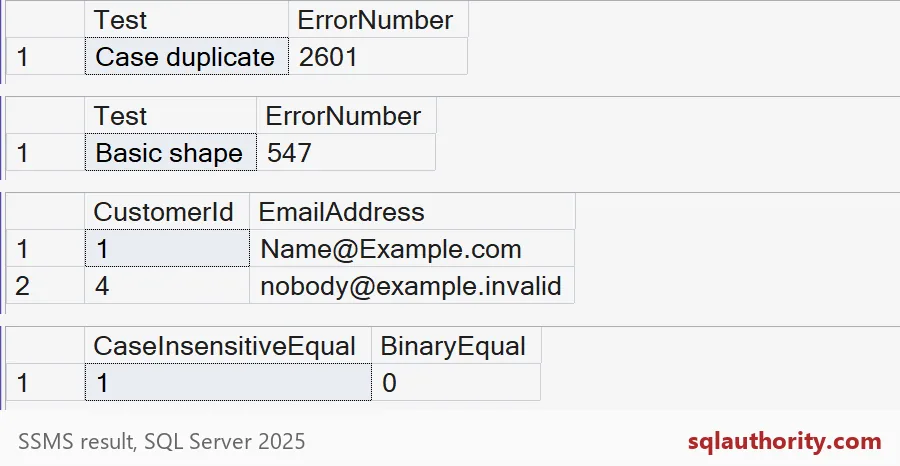
The first comparison returns 1 and the second returns 0. Same two strings, two different answers. That is why you pick the collation on purpose. If you left it to the database default, the unique key would quietly follow that default instead of your rule.
Spaces and length
Two more traps are worth a minute. Trailing spaces come from copy and paste. And a too-long value can arrive from a bad import. Here is what the table does with each, and how SQL Server compares a padded value.
BEGIN TRY
    INSERT dbo.CustomerEmail (EmailAddress) VALUES (N'pad@example.com ');
END TRY
BEGIN CATCH
    SELECT N'Trailing space' AS Test, ERROR_NUMBER() AS ErrorNumber;
END CATCH;

BEGIN TRY
    INSERT dbo.CustomerEmail (EmailAddress)
    VALUES (REPLICATE(N'a', 320) + N'@example.com');
END TRY
BEGIN CATCH
    SELECT N'Too long' AS Test, ERROR_NUMBER() AS ErrorNumber;
END CATCH;

SELECT CASE WHEN N'abc ' = N'abc' THEN 1 ELSE 0 END AS TrailingSpaceEqual;
The padded address fails with 547, because of the CHECK rule on spaces. The long one fails with error 2628, the truncation error. And the last query returns 1: SQL Server ignores trailing spaces when it compares values. So trim in your application before you save, and keep the CHECK as a safety net.

What the database cannot promise
The length is a storage decision. The shape check is a gentle filter. Neither tells you the mailbox exists or that the person owns it. If that matters, send a confirmation message. A fancier pattern rarely helps, because clever patterns reject valid addresses and still accept dead ones. Keep the database rule modest and explicit, then clean up.
DROP TABLE IF EXISTS dbo.CustomerEmail;Next time you design a sign-up table, write the matching rule first and the index second.
An address-shaped string is not a verified mailbox, it is input that passed a shape check.
Published by Pinal Dave on SQLAuthority. More of my work at pinaldave.com.
Discover more from SQL Authority with Pinal Dave
Subscribe to get the latest posts sent to your email.