JSON_QUERY or JSON_VALUE is a choice about the shape the consumer expects. I compare both outputs before treating a NULL result as proof that a property is absent.

Start with the expected value
An object property can hold a string, an object or an array. Those are different JSON values. A report needing a person’s name expects a scalar. A receiver needing the address structure expects the object, including its property names.
JSON_VALUE extracts a scalar. JSON_QUERY extracts an object or array. This example uses their ordinary text-input forms without newer RETURNING options. The declared outputs are therefore nvarchar(4000) and nvarchar(max), respectively.
I’d decide the expected shape before selecting a function. Trying both and keeping whichever result is non-NULL can conceal a changing input contract. A property becoming an object may be an error for a scalar consumer. A permissive fallback can hide that error.
Use one document and five paths
The document contains a name, an address object, an item array and an explicit JSON null. A fifth path is absent. Both functions read each path in lax mode. The output keeps that path beside the two extracted results.
The name returns Ada through JSON_VALUE. JSON_QUERY returns NULL for the same scalar path. The address and items produce the opposite pattern. Their structured fragments appear through JSON_QUERY, while JSON_VALUE returns NULL.
The path argument comes from a typed VALUES list. Variable path arguments require SQL Server 2017 or later. These functions themselves were introduced with SQL Server 2016 JSON support. The example chooses the later requirement rather than changing database settings.
WITH Document AS
(
    SELECT CAST(N'{"name":"Ada","address":{"city":"Mesa"},"items":[2,3],"n":null}'
        AS nvarchar(max)) AS JsonText
), Paths AS
(
    SELECT Id, CAST(JsonPath AS nvarchar(30)) AS JsonPath
    FROM (VALUES (1, N'lax $.name'), (2, N'lax $.address'),
                 (3, N'lax $.items'), (4, N'lax $.n'),
                 (5, N'lax $.missing')) AS v(Id, JsonPath)
)
SELECT p.Id, p.JsonPath, JSON_VALUE(d.JsonText, p.JsonPath) AS ScalarText,
       JSON_QUERY(d.JsonText, p.JsonPath) AS StructuredText
FROM Document AS d
CROSS JOIN Paths AS p
ORDER BY p.Id;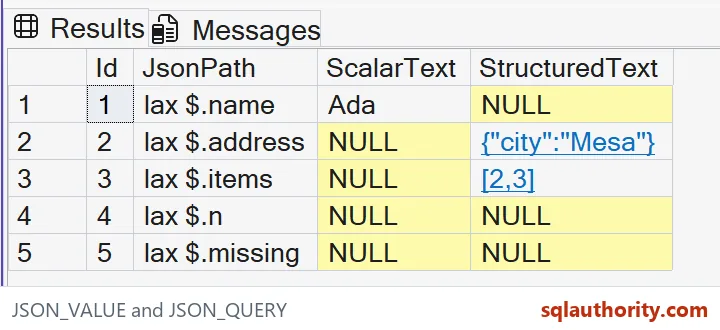

Do not overinterpret a lax NULL
Lax mode is the default when a path mode isn’t specified. It can return NULL for a missing property or an unsuitable value shape. The script writes lax explicitly to make that decision visible. It doesn’t exercise strict-mode exceptions.
The explicit JSON null and absent property both yield NULL in this demonstration. That shared output doesn’t make the underlying documents equivalent. The path and original document retain the context. A separate existence check would answer whether a property is present.
The scalar name also produces NULL through JSON_QUERY even though it exists. Likewise, the present address produces NULL through JSON_VALUE. An extraction NULL alone therefore cannot prove absence. It must be read against the requested shape and path mode.
Keep the output as the intended type
An extracted string is SQL text rather than a JSON string literal. JSON_VALUE removes the surrounding JSON quotation marks from Ada. JSON_QUERY preserves the object or array fragment. Passing those forms to another serializer requires the correct handling.
I can justify strict mode when an unexpected shape should stop processing. That is a separate error contract and needs its own tests. This article’s lax examples do not claim to validate a document schema. They demonstrate extraction from known valid input.
Long scalar strings require another explicit decision. JSON_VALUE ordinarily returns at most 4,000 characters. The tiny name here doesn’t approach it. An application extracting longer text must choose a suitable supported method and test the full value.
Compare complete fragments
The script is a read-only CTE over one literal document and five literal paths. It creates no objects and changes no session state. ORDER BY fixes the path sequence. The complete SQL remains copyable without requiring a screenshot.
Compare both output types and every complete JSON fragment. Keep scalar text separate from the object or array fragment. Preserve the JSON punctuation and NULL distinctions during comparison. A visually truncated object cannot establish the full extracted structure.
Look at the path and the shape together before you trust a NULL.
A NULL result is not proof of an absent property, it depends on the path and shape.
Published by Pinal Dave on SQLAuthority. More of my work at pinaldave.com.
Discover more from SQL Authority with Pinal Dave
Subscribe to get the latest posts sent to your email.