
The DMV sys.dm_tran_database_transactions shows how much log each transaction has written so far. Just a few days ago before I received the email from blog reader asking if there is any DMV which can provide details about the effect of a transaction on the transaction log file. Absolutely! Here is a quick script which can provide the necessary details:
SELECT transaction_id, DB_NAME(database_id) DatabaseName,
database_transaction_begin_time TransactionBegin,
CASE database_transaction_type
WHEN 1 THEN 'Read/Write'
WHEN 2 THEN 'Read only'
WHEN 3 THEN 'System' END AS TransactionType,
CASE database_transaction_state
WHEN 1 THEN 'Not Initialized'
WHEN 3 THEN 'Transaction No Log'
WHEN 4 THEN 'Transaction with Log'
WHEN 5 THEN 'Transaction Prepared'
WHEN 10 THEN 'Commited'
WHEN 11 THEN 'Rolled Back'
WHEN 12 THEN 'Commited and Log Generated' END AS TransactionState,
database_transaction_log_record_count LogRecordCount,
database_transaction_log_bytes_used LogBytesUsed,
database_transaction_log_bytes_reserved LogBytesReserved
FROM sys.dm_tran_database_transactions
WHERE transaction_id > 1000
All the transaction_ID which are over 1000 are user transactions. Let us test the above query to run following transaction.
BEGIN TRANSACTION
UPDATE HumanResources.Department
SET ModifiedDate = ModifiedDate+1
--ROLLBACK
If you do not run ROLLBACK, it will not be a completed transaction. When you run the sys.dm_tran_database_transactions script that’s listed above, it will give you the following output:
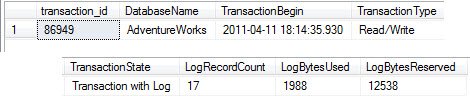
You can clearly see many information over here- from Transaction start time to its types, as well as how many bytes are used and reserved.
Find Which Session Owns the Transaction
The script above tells you how much log a transaction uses, but not who started it. When a log file is growing fast in production, that is the first thing I want to know. You can join this DMV with sys.dm_tran_session_transactions on transaction_id to get the session id:
SELECT st.session_id, DB_NAME(dt.database_id) AS DatabaseName,
       dt.database_transaction_begin_time,
       dt.database_transaction_log_bytes_used,
       dt.database_transaction_log_bytes_reserved
FROM sys.dm_tran_database_transactions AS dt
INNER JOIN sys.dm_tran_session_transactions AS st
    ON st.transaction_id = dt.transaction_id
ORDER BY dt.database_transaction_log_bytes_used DESC;
Once you have the session id, look it up in sys.dm_exec_sessions to see the login name and host name. One more tip: after you finish testing with the UPDATE above, run ROLLBACK. An open transaction keeps holding its locks, and the log cannot be truncated past its oldest record. You can confirm this in the log_reuse_wait_desc column of sys.databases, which shows ACTIVE_TRANSACTION in that case. It is one of the most common reasons I find behind a log file that keeps growing. Close your test transactions, and your log will thank you.
Published by Pinal Dave on SQLAuthority. More of my work at pinaldave.com.
Discover more from SQL Authority with Pinal Dave
Subscribe to get the latest posts sent to your email.

7 Comments. Leave new
Pinal, you should to design SSRS Dashboards based on selects like this. It will be great toolset for tuning database =)
agree!
Any quick way of figuring out when (date&time) the transaction began?
I suppose
select * FROM sys.dm_tran_active_transactions
Hi Mr. Dave,
Can you tell me please
how to put indexing on temp table ?
Hello!
Just a thought – does this mean that Microsoft SQL Server can have a maximum of 1000 internal transactions running at any given time?
Thanks & Regards,
Nakul Vachhrajani
Hello Pinal, recently asked a question on stackexchange about following the progress of a rollback. Max Vernon suggested that dm_tran_database_transactions could be used. Have you ever tried to follow the progress of a large rollback and if so, what did you do?