IS DISTINCT FROM compares nullable values without inventing a substitute for NULL. It answers whether two values differ, including the cases where one or both values are missing. That makes a change-detection condition easier to state and inspect.

Read IS DISTINCT FROM as a comparison rule
SQL Server 2022 and later support this predicate. Two equal non-NULL values are not distinct. Two NULL values are also not distinct. One NULL and one non-NULL value are distinct. Different non-NULL values are distinct as well.
The inverse, IS NOT DISTINCT FROM, identifies the matching cases under that rule. It includes the both-NULL case. These are predicates for conditions such as WHERE, rather than a new stored Boolean column type.
Keep ordinary equality visible
An ordinary equality comparison involving NULL has an UNKNOWN result. A WHERE condition only selects rows for which its predicate is true. A simple unequal comparison misses NULL becoming a value or a value becoming NULL.
The example gives each input an explicit integer type. Its nine cases include both missing values, one missing value in either position, equal values and different values. Integer boundary values add cases without introducing a substitute for missing data.
WITH ValuePairs AS
(
    SELECT CaseId, LeftValue, RightValue
    FROM (VALUES
        (1, CAST(NULL AS int),        CAST(NULL AS int)),
        (2, CAST(NULL AS int),        CAST(0 AS int)),
        (3, CAST(0 AS int),           CAST(NULL AS int)),
        (4, CAST(0 AS int),           CAST(0 AS int)),
        (5, CAST(0 AS int),           CAST(-1 AS int)),
        (6, CAST(-1 AS int),          CAST(-1 AS int)),
        (7, CAST(-2147483648 AS int), CAST(NULL AS int)),
        (8, CAST(-2147483648 AS int), CAST(-2147483648 AS int)),
        (9, CAST(2147483647 AS int),  CAST(-2147483648 AS int))
    ) AS v(CaseId, LeftValue, RightValue)
)
SELECT CaseId, LeftValue, RightValue,
    CASE WHEN LeftValue IS DISTINCT FROM RightValue THEN 1 ELSE 0 END AS IsDistinct,
    CASE WHEN LeftValue IS NOT DISTINCT FROM RightValue THEN 1 ELSE 0 END AS IsNotDistinct,
    CASE
        WHEN LeftValue = RightValue THEN N'True'
        WHEN LeftValue <> RightValue THEN N'False'
        ELSE N'Unknown'
    END AS OrdinaryEquals
FROM ValuePairs
ORDER BY CaseId;
The displayed one and zero values are produced by CASE expressions. The final column separately spells out ordinary equality as True, False or Unknown. The two NULL-aware comparison columns remain complementary across every case.
| CaseId | LeftValue | RightValue | IsDistinct | IsNotDistinct | OrdinaryEquals |
|---|---|---|---|---|---|
| 1 | NULL | NULL | 0 | 1 | Unknown |
| 2 | NULL | 0 | 1 | 0 | Unknown |
| 3 | 0 | NULL | 1 | 0 | Unknown |
| 4 | 0 | 0 | 0 | 1 | True |
| 5 | 0 | -1 | 1 | 0 | False |
| 6 | -1 | -1 | 0 | 1 | True |
| 7 | -2147483648 | NULL | 1 | 0 | Unknown |
| 8 | -2147483648 | -2147483648 | 0 | 1 | True |
| 9 | 2147483647 | -2147483648 | 1 | 0 | False |
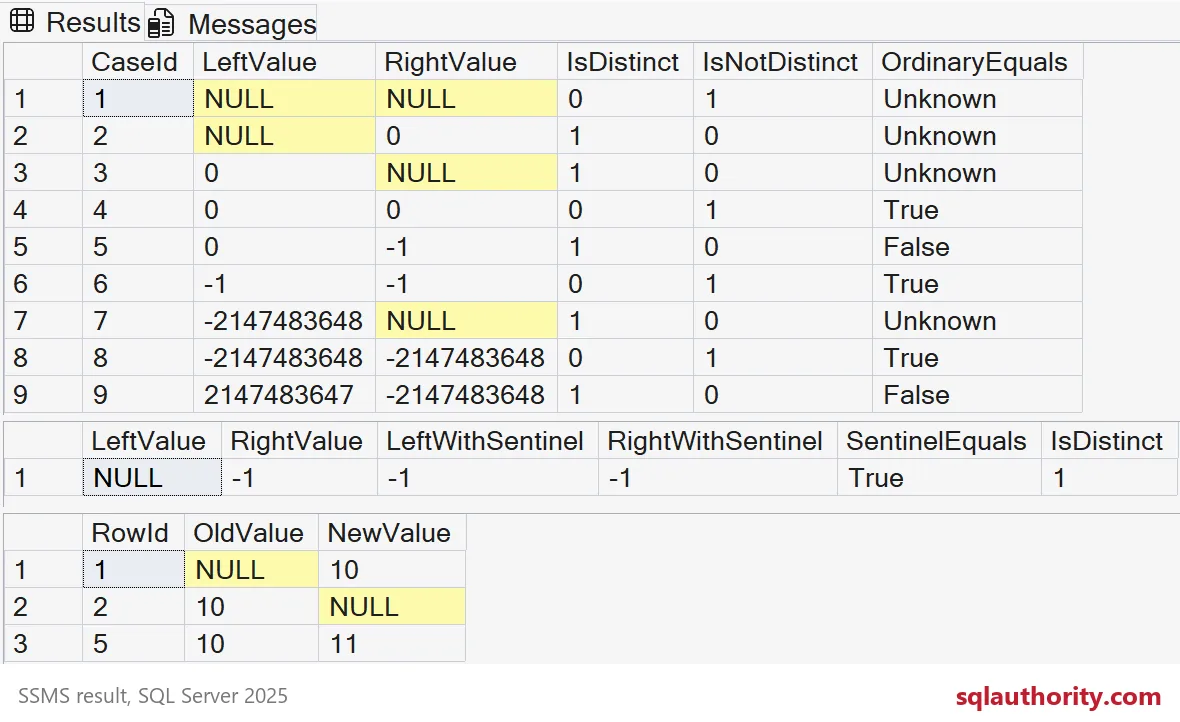
See why a sentinel can hide a change
A common shortcut replaces NULL with a chosen integer before comparing values. If that integer is also valid data, two different inputs can collapse to the same replacement. The result then describes the substituted values instead of the original pair.
The companion example compares NULL with minus one. Applying ISNULL(value, -1) to both sides produces minus one twice. That equality is true, although the original nullable values differ. The distinct comparison keeps their difference visible.
WITH SentinelExample AS
(
    SELECT CAST(NULL AS int) AS LeftValue, CAST(-1 AS int) AS RightValue
)
SELECT LeftValue, RightValue,
    ISNULL(LeftValue, -1) AS LeftWithSentinel,
    ISNULL(RightValue, -1) AS RightWithSentinel,
    CASE WHEN ISNULL(LeftValue, -1) = ISNULL(RightValue, -1)
        THEN N'True' ELSE N'False' END AS SentinelEquals,
    CASE WHEN LeftValue IS DISTINCT FROM RightValue THEN 1 ELSE 0 END AS IsDistinct
FROM SentinelExample;| LeftValue | RightValue | LeftWithSentinel | RightWithSentinel | SentinelEquals | IsDistinct |
|---|---|---|---|---|---|
| NULL | -1 | -1 | -1 | True | 1 |

Select only the rows whose value changed
A second VALUES list pairs an old integer with a new integer for six rows. The WHERE condition expresses the intended comparison directly. No UPDATE is performed: the query only returns the pairs that satisfy the change rule.
WITH ChangeCases AS
(
    SELECT RowId, OldValue, NewValue
    FROM (VALUES
        (1, CAST(NULL AS int), CAST(10 AS int)),
        (2, CAST(10 AS int),   CAST(NULL AS int)),
        (3, CAST(10 AS int),   CAST(10 AS int)),
        (4, CAST(NULL AS int), CAST(NULL AS int)),
        (5, CAST(10 AS int),   CAST(11 AS int)),
        (6, CAST(-1 AS int),   CAST(-1 AS int))
    ) AS v(RowId, OldValue, NewValue)
)
SELECT RowId, OldValue, NewValue
FROM ChangeCases
WHERE OldValue IS DISTINCT FROM NewValue
ORDER BY RowId;
The changed identifiers are 1, 2 and 5. They cover NULL becoming 10, 10 becoming NULL and 10 becoming 11. Equal tens, two NULL values and equal minus-one values are excluded.
| RowId | OldValue | NewValue |
|---|---|---|
| 1 | NULL | 10 |
| 2 | 10 | NULL |
| 5 | 10 | 11 |
Keep the comparison attached to your data contract
These examples use typed integers and compare one value per row. Character data adds its own type and collation rules. A predicate alone does not define your row identity, business meaning of NULL or comparison policy for every data type. Make those choices explicit before extending the pattern.
The three queries above are read-only SELECT statements over VALUES and common table expressions. They create no tables and change no database context, session options or transactions. Together they return nine comparison cases, one sentinel-collision row and three changed rows.
Try it on your own change-detection query and drop the sentinel.
NULL is not a value to replace, it is a state IS DISTINCT FROM compares directly.
Published by Pinal Dave on SQLAuthority. More of my work at pinaldave.com.
Discover more from SQL Authority with Pinal Dave
Subscribe to get the latest posts sent to your email.