Your index rebuild maintenance plan runs every Sunday night, takes four hours, fills your transaction log, delays your backup, and may be buying you a great deal less than everybody assumes.
I am not going to tell you to turn it off blindly. I am going to tell you what it is actually doing, so you can measure whether it deserves those four hours.

The Thing Everybody Believes
Fragmentation is bad, so we defragment. It sounds obviously correct, and for a long time it mostly was.
That belief was built in the era of spinning disks. Reading pages that sat next to each other was dramatically faster than reading pages scattered across a platter, because a physical arm had to move.
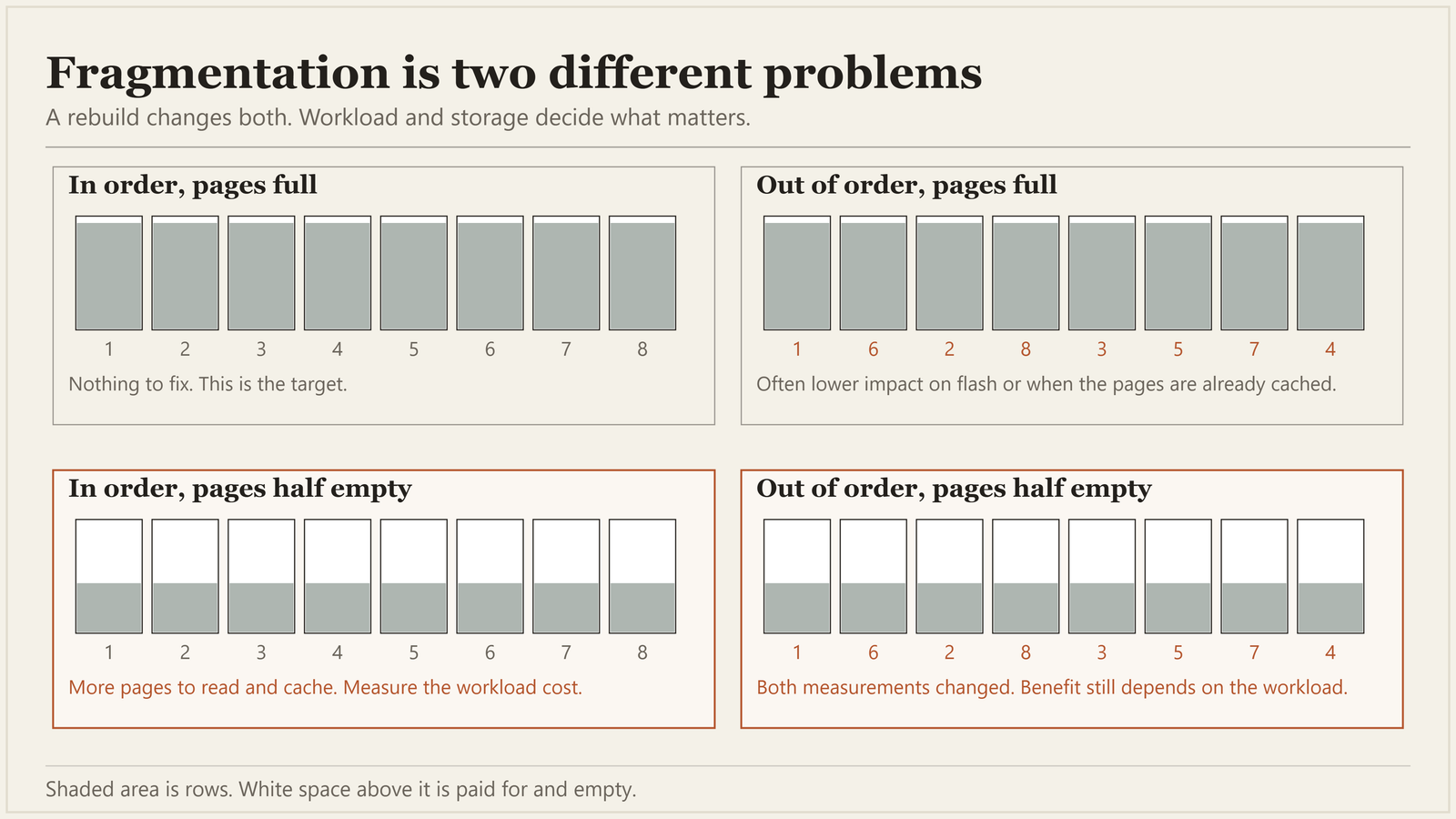
On flash-backed storage, the penalty for scattered reads can be much smaller. If the pages are already in the buffer pool, SQL Server need not fetch them from storage at all. Page density still matters: half-empty pages take up memory too.
So one historical reason for rebuilding often matters less than it once did, while the job itself stayed.
What the Rebuild Is Really Giving You
Two benefits are commonly credited to the wrong cause, and it is worth separating them.
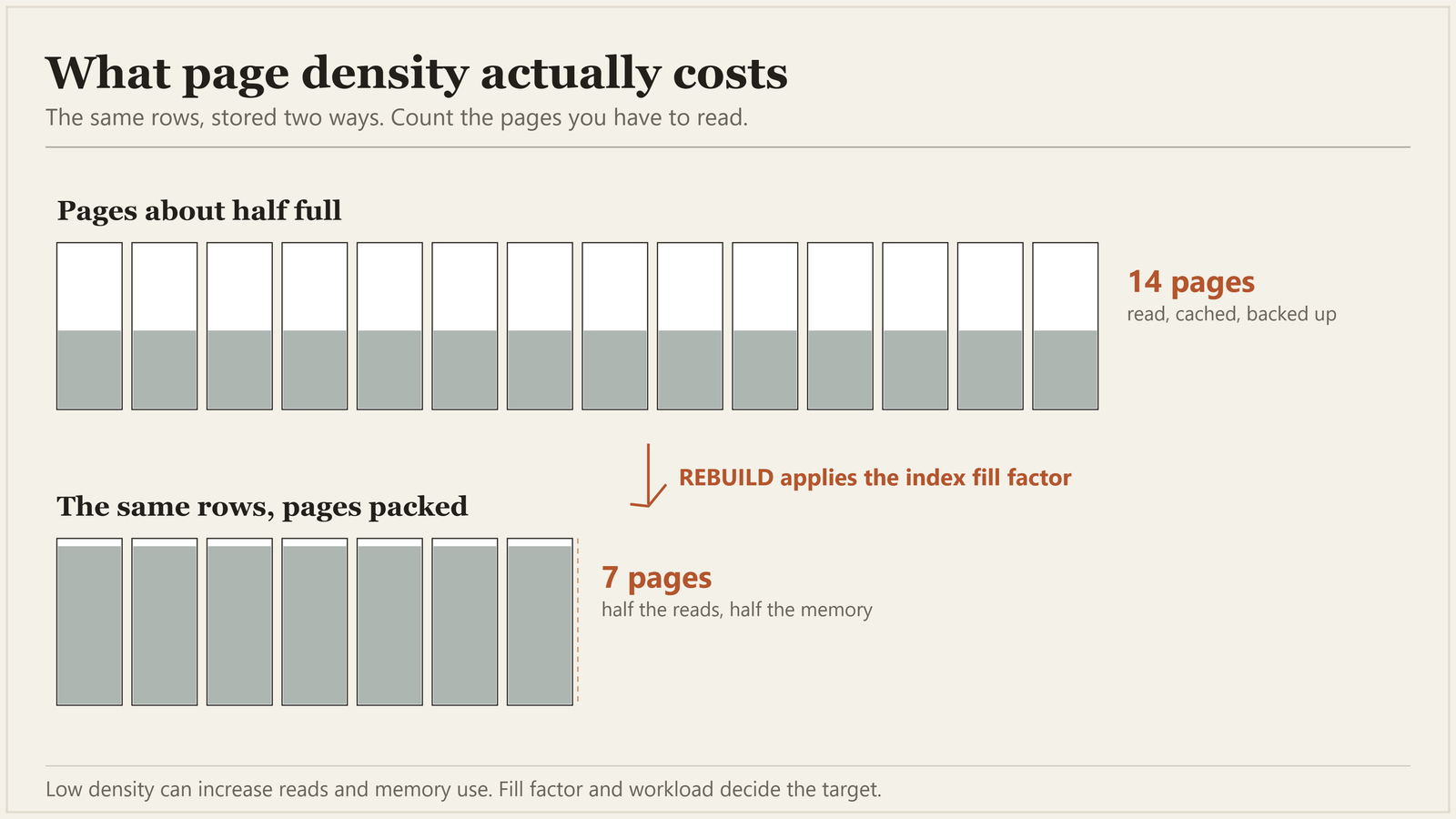
Page density. Order and fullness are two different measurements. If pages holding the same rows are half empty, a scan reads roughly twice as many pages. Those pages take twice the room in memory too. A rebuild packs them back up. That is a real win, and it is why I still rebuild some things.
One caveat. A lower fill factor reserves that space on purpose. Low density only earns a rebuild once it lines up with a workload cost you can point at.
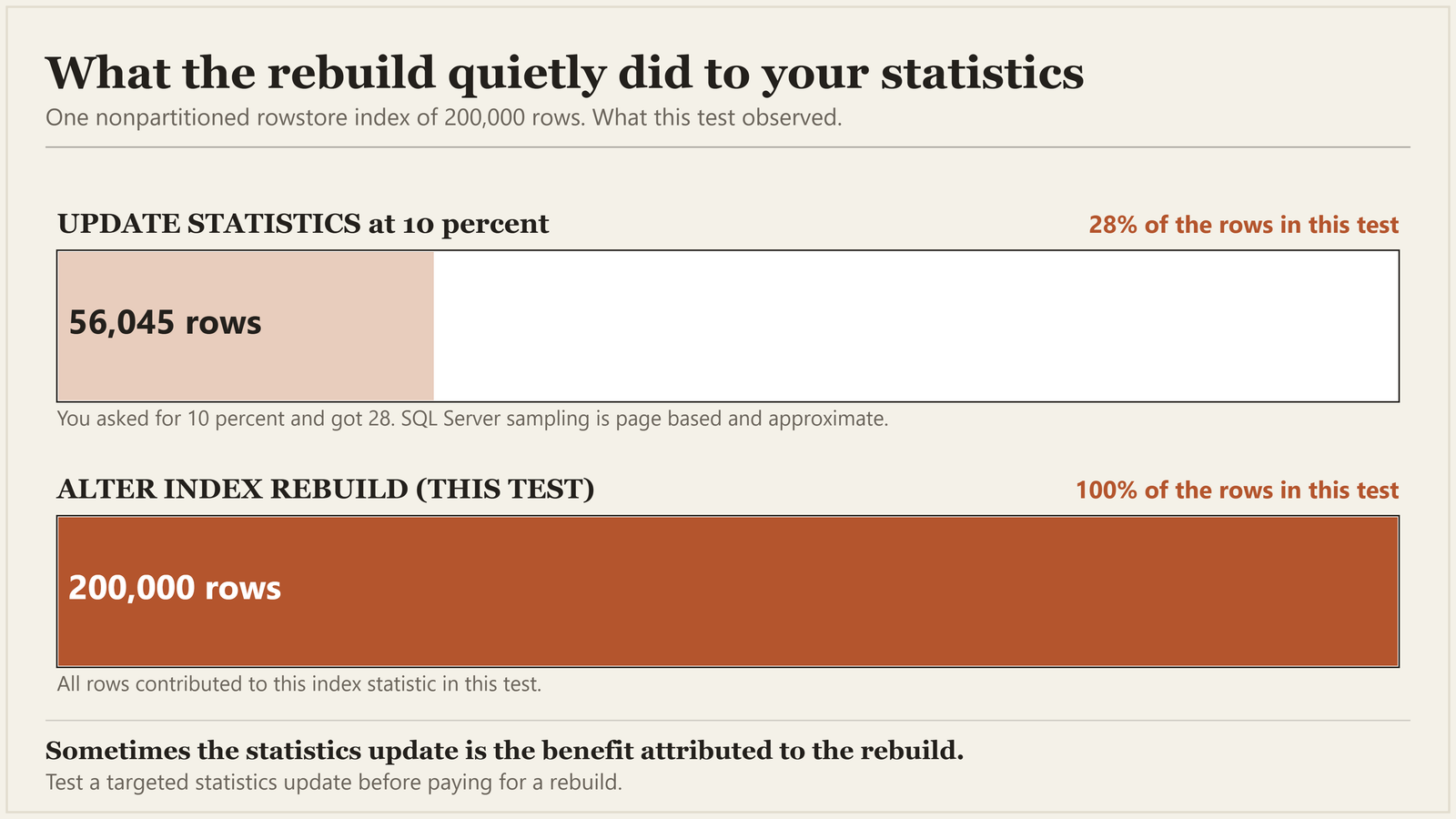
Statistics. A regular, nonpartitioned rowstore rebuild also updates the index statistics by reading every row. I checked this rather than repeating it. I sampled a two hundred thousand row index at ten percent. rows_sampled came back as 56,045, nearer twenty eight percent, because SQL Server samples whole pages. After an ALTER INDEX REBUILD the same statistic showed 200,000. Every row, without a separate statistics job.
Partitioned or resumable rebuilds can use sampled statistics instead. Rebuilding also leaves separate column statistics alone.
Here is the uncomfortable part: sometimes that statistics update is the benefit people are seeing. The query that got faster after the weekend job may not have improved because pages were reordered. It may have improved because the optimizer received fresher or more thoroughly sampled information about that index.
If that is what is helping you, test a targeted statistics update separately. It can deliver the same improvement with much less work than rebuilding the index.
What It Costs You
In full recovery, an index rebuild is fully logged, and rebuilding a fifty gigabyte index generates a very large amount of transaction log. In simple or bulk-logged recovery, an offline rebuild can be minimally logged.
Minimally logged is not log free. The operation still needs room to finish and to roll back, so check your recovery model, rebuild options, version and replicas before estimating anything.
In full recovery, that log makes your log backups bigger. Availability groups must send the log to replicas; log shipping must copy and restore the backups. A rebuild also changes a great many data pages. The affected extents enter the next differential, so a broad rebuild can push that backup towards the size of a full one.
That holds only while the rebuild lands after the full backup those differentials are measured against. An ordinary full backup afterwards resets that base. A COPY_ONLY one does not. The order of your jobs is worth a look before their schedule is.
I have seen a Sunday maintenance job triple the size of the Monday differential, every week, for years, at a company that was paying for offsite storage by the gigabyte.

And then there is the simplest cost of all. Somewhere in that four hours, it may be rebuilding indexes that no user query has read during the observation window. Pure work, pure log and pure backup weight, unless another workload or operational requirement still needs them.
What to Actually Do
Stop letting one generic plan make every decision. The built-in maintenance task lets you choose databases and objects. It does not know which query slowed down, whether page density caused it, or whether the rebuild helped at all. Selection is not the same as diagnosis.
Use one of the community scripts instead. Ola Hallengren’s maintenance solution is free, and it is the closest thing our field has to a standard. It lets you say something more specific than the wizard can: reorganize between five and thirty percent fragmentation, rebuild above thirty, ignore anything under a thousand pages entirely.
I should be honest about those two numbers, because this article is an argument against inherited belief. Five and thirty were rough orientation guidance, offered long ago as somewhere to start, and they hardened into doctrine because they were easy to repeat. Nobody tested them on your workload, or on mine. They still beat rebuilding a whole database indiscriminately. They are not a measurement. Treat them as an opening position.
The thousand-page cutoff deserves attention too. Small tables can report terrifying fragmentation percentages without a meaningful workload cost. It is easy to spend a weekend window defragmenting objects whose few pages were never the bottleneck.
Before you tune the schedule, look at what you actually have:
SELECT OBJECT_SCHEMA_NAME(ps.object_id) AS SchemaName,
       OBJECT_NAME(ps.object_id) AS TableName,
       i.name AS IndexName,
       ps.partition_number,
       ps.page_count,
       CAST(ps.avg_fragmentation_in_percent AS decimal(5,1)) AS FragPct,
       CAST(ps.avg_page_space_used_in_percent AS decimal(5,1)) AS PageFullnessPct
FROM sys.dm_db_index_physical_stats(DB_ID(), NULL, NULL, NULL, 'SAMPLED') AS ps
JOIN sys.indexes AS i
  ON i.object_id = ps.object_id AND i.index_id = ps.index_id
WHERE ps.page_count >= 1000
  AND ps.index_level = 0
  AND ps.alloc_unit_type_desc = 'IN_ROW_DATA'
  AND i.type IN (1, 2)
ORDER BY ps.avg_fragmentation_in_percent DESC;
Read page fullness alongside fragmentation, never as a verdict on its own. High nineties means the sampled leaf pages are packed and there is little to reclaim. Fifties or sixties is a reason to go and look at scans, memory pressure and page splits. It is not automatic permission to rebuild, because a low fill factor may have reserved that space on purpose.
Start with SAMPLED when you need page-density information. It normally samples about one percent of the pages, but SQL Server uses DETAILED automatically for indexes or heaps under ten thousand pages. Avoid running DETAILED broadly on production because it reads every page.
Passing NULL for the object scans across the database. The page count filter trims the output, not the work. Run this inventory out of hours; use explicit object and index IDs for scheduled checks.
Before SQL Server 2022, this query needs VIEW DATABASE STATE; the usage query below needs VIEW SERVER STATE. From SQL Server 2022, use VIEW DATABASE PERFORMANCE STATE and VIEW SERVER PERFORMANCE STATE respectively.
Separate your statistics decision from your index decision. If measurement points at statistics, update those statistics on their own schedule. Test index maintenance where page density or fragmentation lines up with a performance problem you can name.
Look at what you are maintaining first. Find the indexes with no recorded reads and heavy writes and treat them as candidates to investigate, checking constraints, reporting and replicas before removing anything. Every index safely retired is one the job never has to touch again. Shrinking the work beats scheduling it more cleverly.
SELECT OBJECT_SCHEMA_NAME(i.object_id) AS SchemaName,
       OBJECT_NAME(i.object_id) AS TableName,
       i.name AS IndexName,
       COALESCE(us.user_seeks, 0)
         + COALESCE(us.user_scans, 0)
         + COALESCE(us.user_lookups, 0) AS ReadOperations,
       COALESCE(us.user_updates, 0) AS UpdateOperations
FROM sys.indexes AS i
JOIN sys.tables AS t
  ON t.object_id = i.object_id
LEFT JOIN sys.dm_db_index_usage_stats AS us
  ON us.object_id = i.object_id
 AND us.index_id = i.index_id
 AND us.database_id = DB_ID()
WHERE i.index_id > 1
  AND i.type = 2
  AND t.is_memory_optimized = 0
  AND i.is_hypothetical = 0
  AND i.is_disabled = 0
  AND OBJECTPROPERTY(i.object_id, 'IsUserTable') = 1
ORDER BY ReadOperations, UpdateOperations DESC;
The query excludes memory-optimized tables explicitly. Type alone will not catch their nonclustered indexes. The usage view has no counters for them, and the LEFT JOIN would turn those missing counters into zeros. Absent is not the same as unused. Check those tables separately in sys.dm_db_xtp_index_stats.
One warning before you act on it. Those counters clear when the engine restarts, and a detach or AUTO_CLOSE shutdown removes the rows entirely. An index that looks unused may be one nobody has needed since Tuesday. Note when the window opened, and let it cover a full business cycle with month end in it.
The Test That Gives You an Answer
If somebody on your team is certain the rebuild is critical, there is a controlled way to test the claim. It is also more productive than having the argument.
Pause only the rebuild step, under normal change control, with a rollback plan. Cover a representative business cycle, not a quiet fortnight standing in for month end. Keep statistics updates running. Use Query Store or your existing baseline to compare duration, CPU, logical reads, waits and plan changes.
Sometimes nothing visible degrades. The Sunday night window frees up, the differentials shrink, and the log backups stop spiking. That is evidence, provided the observation window represented the workload.
On some systems something does degrade. That is a candidate, not a conclusion. Data grows, plans change, people deploy things.
Test the affected index statistics first, using FULLSCAN to match a regular nonpartitioned rebuild. If that clears the regression, you have a fix that does not require rebuilding.
If it does not, test a rebuild of that index and compare the same workload. If performance recovers, you have evidence for targeted maintenance. If it does not, keep investigating. A failed statistics update is not an instruction to rebuild the database.
Either outcome is a win. The only losing position is the one where nobody has ever checked.
If nobody has four hours to go and find out, that is a large part of what a Comprehensive Database Performance Health Check is for. Four hours working out which of your maintenance earns its window and which has been running on faith since before you arrived. I never ask for your password. Every script goes home with your team, so you never need me again, at a fixed price agreed before we start.
Why This Job Never Gets Questioned
Because it runs at two in the morning on a Sunday and it succeeds.
Green tick, every week, for eleven years.

Too often, anything that reports success escapes review. We examine the things that fail.
There is usually a person attached to this job too, and it is worth being kind about. The person who set it up left years ago. The person who inherited it did not choose it and does not fully trust it. They are also not going to be the one who switches off eleven years of green ticks. Fear is a terrible reason to spend four hours every Sunday. It is also the most common one I meet.
So the job that quietly consumes four hours and floods your log every weekend is safe forever, while somebody three floors up is being asked to justify a storage bill it is largely responsible for.
A maintenance job that has succeeded every week for eleven years is not proof that it is needed, it is only proof that nobody has had a reason to look at it.
Published by Pinal Dave on SQLAuthority. More of my work at pinaldave.com.