
Question: Which is faster for a conditional count, SUM or COUNT? First make the expressions count the same rows. Then compare their plans and measurements; neither name guarantees better performance.

At a financial-technology organization, we spent a day on a Comprehensive Database Performance Health Check. Tuning five expensive queries reduced their combined time from over three hours to about six minutes. That broader work prompted a senior developer’s smaller question: should an existing SUM be changed to COUNT?
The team expected COUNT to be faster. I used AdventureWorks to compare the same table access. But there’s an easy mistake in the expression, and it matters before we time anything.
COUNT includes zero
DECLARE @Numbers table (n int);
INSERT @Numbers VALUES (10), (60), (70);
SELECT SUM(CASE WHEN n > 50 THEN 1 ELSE 0 END) AS SumMatches,
       COUNT(CASE WHEN n > 50 THEN 1 END) AS CountMatches,
       COUNT(CASE WHEN n > 50 THEN 1 ELSE 0 END) AS CountAllNonNull
FROM @Numbers;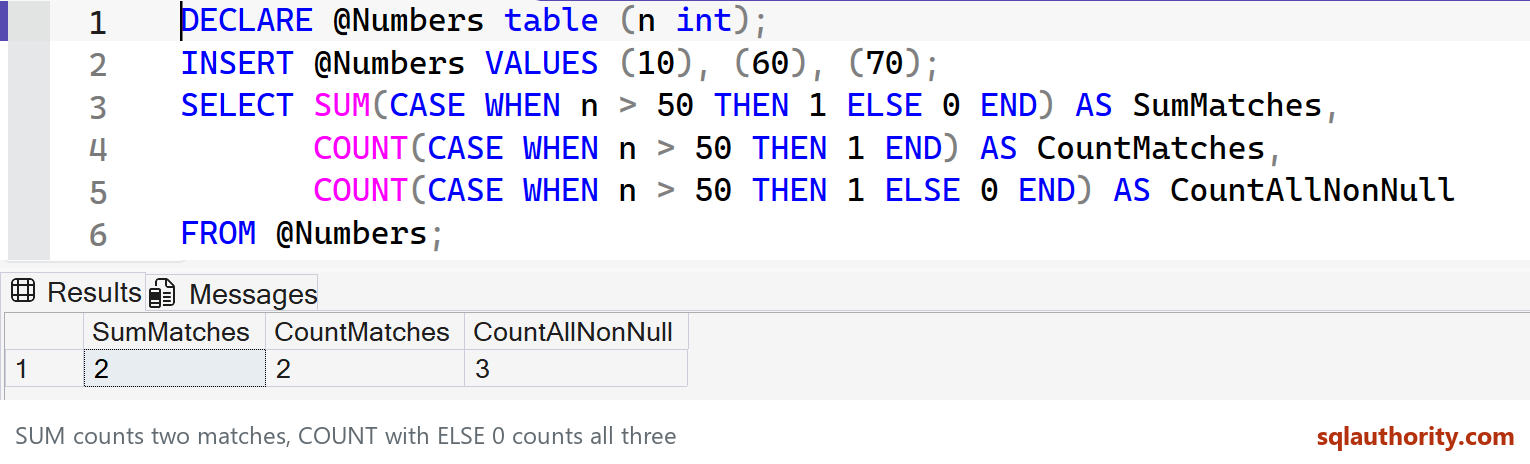
This returns 2, 2 and 3. SUM adds the ones. COUNT counts non-null values, so the third expression counts the zero for n = 10 as well. Omit ELSE, or use ELSE NULL, when only matching rows should contribute to COUNT.
Compare the original workload fairly
USE AdventureWorks2025;
GO
SET STATISTICS IO ON;
SELECT SUM(CASE WHEN SalesOrderID > 50 THEN 1 ELSE 0 END) AS MatchingRows
FROM Sales.SalesOrderDetail WHERE ProductID > 750;
SELECT COUNT(CASE WHEN SalesOrderID > 50 THEN 1 END) AS MatchingRows
FROM Sales.SalesOrderDetail WHERE ProductID > 750;
SET STATISTICS IO OFF;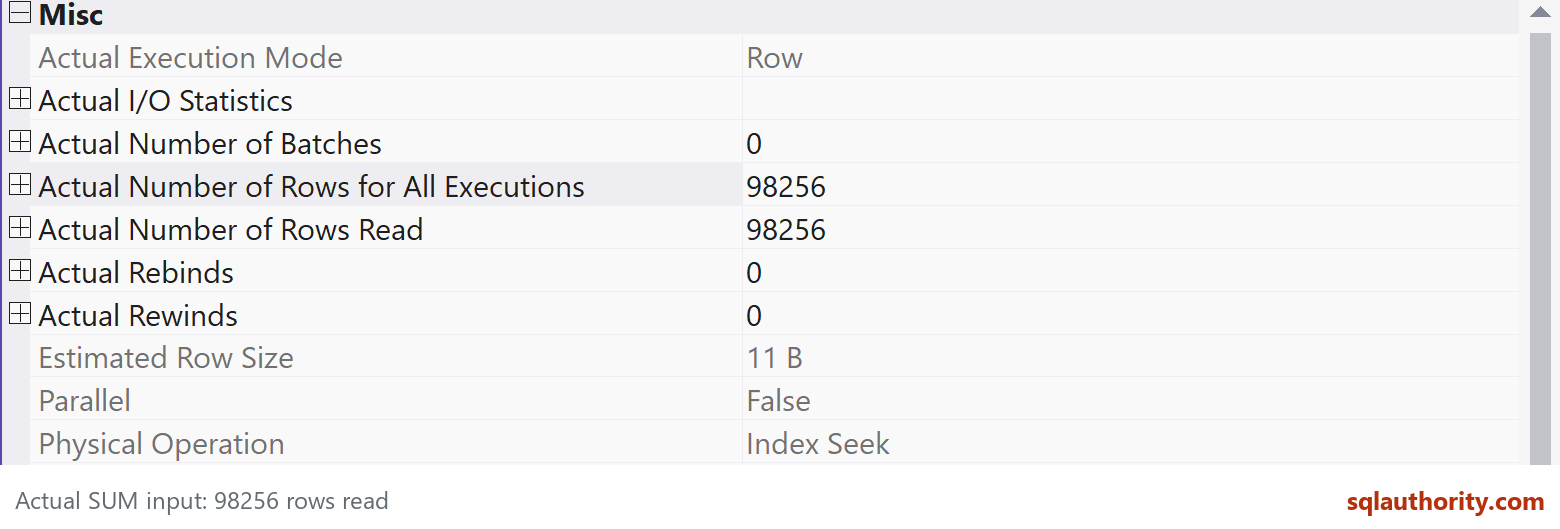
Use the installed AdventureWorks database name and enable the actual execution plan in SSMS for this comparison. Examine the access operators and logical reads, and repeat under comparable conditions. Similar operators or equal estimated batch percentages don’t guarantee equal elapsed time on every server.
My original sample showed equal logical reads. Its SalesOrderID > 50 condition qualified all the selected sample rows, which hid the ELSE 0 error in COUNT. The three-row example above exposes that mistake. The corrected pair expresses a conditional count explicitly.
There is also an empty-input difference: COUNT returns 0, while SUM returns NULL. If the required answer is zero for an empty set, use COALESCE around SUM. Choose the expression that expresses the requirement clearly, then measure any meaningful performance difference. Changing SUM to COUNT alone was not the reason five client queries became faster.
Have you measured a case where the corrected expressions produced different plans? Share the query, relevant schema and test conditions so we can compare it properly.
Published by Pinal Dave on SQLAuthority. More of my work at pinaldave.com.
Discover more from SQL Authority with Pinal Dave
Subscribe to get the latest posts sent to your email.




10 Comments. Leave new
The core part here is to compute the scalar value, since both expressions are essentially the same, the execution plan should be same.
Doesn’t including 0 in the COUNT statement mean everything is counted (so you basically get the count of rows) whereas if it is NULL only the 1 (ie non-null) values get counted. It has to be 0 for the SUM because the 1s and 0s get added up? I appreciate that the pint of this is about the execution difference between SUM and COUNT but the use seems wrong to me.
I agree that SUM wouldn’t be any slower than count (certainly not measurably), but the queries you’ve used in the demo aren’t interchangeable – they will return different results (unless SalesOrderID is always > 50 when ProductID > 750).
Try out the queries sir – they return the same results.
It might for those conditions, but it won’t for every query. I think Sean is correct, if you returned null instead of 0 for the count then it would return the same result as SUM. Count is just counting how many records have a value. 0 is a value just as much as 1 is a value, so count will count both instances. SUM however will add 0’s and 1’s and get you a number based on how many records there are.
This doesn’t take away from the point of the post – SUM and COUNT I think would have the same performance, but if the result is different then the performance doesn’t matter.
Try out the below and you’ll see the different results (I’m using the AdventureWorks2017 database, not 2014). The only difference from your query is the SalesOrderID:
— Use of SUM — Original Query
SELECT SUM(CASE WHEN SalesOrderID > 56245 THEN 1 ELSE 0 END)
FROM [Sales].[SalesOrderDetail]
WHERE ProductID > 750
GO –returns 52364
— Use of COUNT — New Proposed Query
SELECT COUNT(CASE WHEN SalesOrderID > 56245 THEN 1 ELSE 0 END)
FROM [Sales].[SalesOrderDetail]
WHERE ProductID > 750
GO –returns 98256
If the result is different, the performance would not matter as you said.
My story is where the result is the same SUM and COUNT behaves identically.
Even though if you try out your query where the result is different…. in terms of performance, If you check the Statistics, you will notice that both does identical Logical Read and Execution Plan is same.
So my story holds true even in the case of different results.
SUM and COUNT both performances equal in terms of speed and resource consumption in terms of page reads.
Knew it before, but could not prove it. Thanks for the blog Pinal.
Hello, thank you for this analysis. Does this work on all SQL versions or is it meant for a specific version?
All the versions!