
This is the list of the all the articles in the series of computed column.
SQL SERVER – Computed Column – PERSISTED and Storage
This article talks about how computed columns are created and why they take more storage space than before.
SQL SERVER – Computed Column – PERSISTED and Performance
This article talks about how PERSISTED columns give better performance than non-persisted columns.
SQL SERVER – Computed Column – PERSISTED and Performance – Part 2
This article talks about how non-persisted columns give better performance than PERSISTED columns.
SQL SERVER – Computed Column and Performance – Part 3
This article talks about how Index improves the performance of Computed Columns.
SQL SERVER – Computed Column – PERSISTED and Storage – Part 2
This article talks about how creating index on computed column does not grow the row length of table.
SQL SERVER – Computed Columns – Index and Performance
This article summarized all the articles related to computed columns.
Previously, I wrote a blog post on the subject SQL SERVER – Computed Column – PERSISTED and Storage. I promised at the end of the article that I will write about the effect of persisted columns in terms of performance in my future blog posts. In this article, we will see how persisted column is better considering performance.
Before I begin talking about the subject, please remember that I have created an example here where the calculation of the computed column is a bit expensive. And because of that, persisted columns are giving better performance than the cost of reading IO from database.
Let us run the following example first.
USE tempdb
GO
-- Create Table
IF EXISTS (SELECT * FROM sys.objects WHERE OBJECT_ID = OBJECT_ID(N'[dbo].[CompCol]') AND TYPE IN (N'U'))
DROP TABLE [dbo].[CompCol]
GO
IF EXISTS (SELECT * FROM sys.objects WHERE OBJECT_ID = OBJECT_ID(N'[dbo].[CompCol_P]') AND TYPE IN (N'U'))
DROP TABLE [dbo].[CompCol_P]
GO
CREATE TABLE CompCol (ID INT,
FirstName VARCHAR(100),
LastName CHAR(8000))
GO
CREATE TABLE CompCol_P (ID INT,
FirstName VARCHAR(100),
LastName CHAR(8000))
GO
-- Insert One Hundred Thousand Records
INSERT INTO CompCol (ID,FirstName,LastName)
SELECT TOP 100 ROW_NUMBER() OVER (ORDER BY a.name) RowID,
'Bob',
CASE WHEN ROW_NUMBER() OVER (ORDER BY a.name)%2 = 1 THEN 'Smith'
ELSE 'Brown' END
FROM sys.all_objects a
CROSS JOIN sys.all_objects b
GO
INSERT INTO CompCol_P (ID,FirstName,LastName)
SELECT TOP 100 ROW_NUMBER() OVER (ORDER BY a.name) RowID,
'Bob',
CASE WHEN ROW_NUMBER() OVER (ORDER BY a.name)%2 = 1 THEN 'Smith'
ELSE 'Brown' END
FROM sys.all_objects a
CROSS JOIN sys.all_objects b
GO
-- Add Computed Column
ALTER TABLE dbo.CompCol ADD
FullName AS POWER(LEN(LEFT((FirstName+CAST(ID AS VARCHAR(100))),3)), 12)
GO
-- Add Computed Column PERSISTED
ALTER TABLE dbo.CompCol_P ADD
FullName_P AS POWER(LEN(LEFT((FirstName+CAST(ID AS VARCHAR(100))),3)), 12) PERSISTED
GO
-- Select Comparision
SELECT FullName
FROM dbo.CompCol
WHERE FullName = 531441
GO
SELECT FullName_P
FROM dbo.CompCol_P
WHERE FullName_P = 531441
GO
-- Clean up Database
DROP TABLE CompCol
DROP TABLE CompCol_P
GO
Once you run the code shown above, please enable execution plan while running SELECT statement.
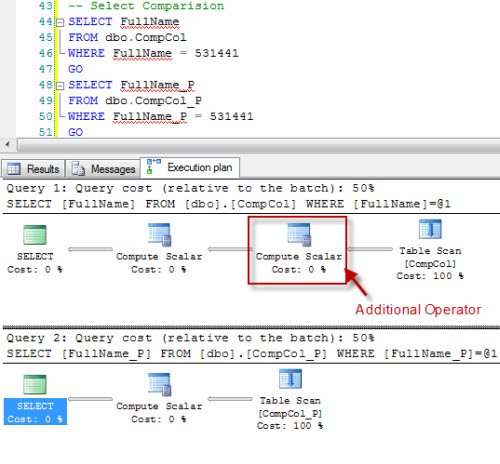
You can clearly see that there is an additional operator when columns are not persisted. In fact, that operation occurs when the column value of the computed column is calculated at run time. Let us compare the final cost of both the operations by reading data from mouse-over pop up.
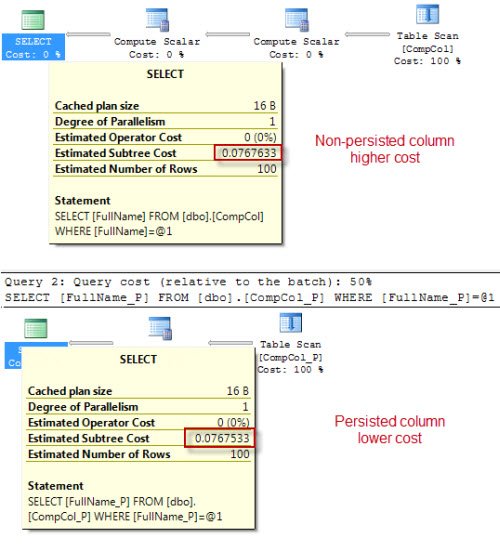
You can clearly see that in the case of the persisted column, the cost is lower compared to the value of non-persisted column.
When the computation is complex, a persisted column improves performance by pre-calculating the values of computed columns.
Choosing PERSISTED or Not for a Computed Column
Here is the rule of thumb I use. If the formula is cheap and you rarely filter on the result, leave it non-persisted and save the space. If the math is heavy, or you search and sort on the result often, persist it or add an index on it.
Before you persist anything, check that the expression is deterministic, meaning it always returns the same result for the same input. COLUMNPROPERTY with the IsDeterministic property tells you. An expression that uses GETDATE(), for example, cannot be persisted.
Always verify with your own data. Compare the execution plans and run SET STATISTICS IO, TIME ON for both versions before you pick a winner.
Published by Pinal Dave on SQLAuthority. More of my work at pinaldave.com.
Discover more from SQL Authority with Pinal Dave
Subscribe to get the latest posts sent to your email.




22 Comments. Leave new
Hello Pinal,
I have a doubt regarding computed column. According to my understanding valud in a persisted computer column will be populated when we perform an INSERT operation on that table (Correct me if i am wrong). So what overhead does the persisted column will have while performing an INSERT operation on the table?
Regards,
Taher
hey , nice blog , like it ,
won’t be nice if i u can clickover to my blog page too ,
& post some suggestion
what a small difference… at the 5th decimal place^^
Taher – It should be the same as INSERT +(cost of the calculation). It will still save you resources since it is a one-time computation instead of a computation every time you query the data.
Jason,
Thanks :)
System.NullReferenceException
未将对象引用设置到对象的实例。
Stack Trace:
在 Quest.Toad.ConnectionManager.ConnectionControl.get_CanRename()
在 Quest.Toad.ConnectionManager.ConnectionControl.UpdateActions()
在 Quest.Toad.ConnectionManager.ConnectionControl..ctor()
在 Quest.Toad.ConnectionManager.ConnectionManagerControl.InitializeComponent()
在 Quest.Toad.ConnectionManager.ConnectionManagerControl..ctor()
Hi
Another consideration is whether or you are using the computed column in an index. Adding a column to an index is one method of persisting, and if you are doing so, it is worth considering whether your queries will use that index.
I often use a computed column as a hash check (please note, for mission critical applications, don’t JUST do a hash check, do an initial hash check for higher performance, and then do a column check as well. I have encountered one scenario where we actually had 2 rows with different data and the same hash. Unlikely, but possible), and create an index on the computed column.
In this case, persisting the column will add no benefit, and increase the storage necessary
Pinal,
I need to add 2 columns to a table (A Body Mass Index column and a Body Surface Area column) both of which have a semi complicated equasion; need to use height and weight in the calculation and both need to be numeric and greater than 0. Unfortunately the height and weight columns are Varchar data types.
I am torn between using Computed Columns Persisted or Triggers to populate these columns.
Which method would you suggest I use and why?
Thanks in advance,
Mike
Good question, no answer yet?
Good question, any answer yet?
One thing to notice is that that if you want to use triggers, you are bound to persistent fields.
Thanks for your response nano2k. It was decided to perform these calculations in application code. If we did decide to perform these calculations on the database we would have gone with computed columns (persisted) over using triggers.
Hi,
I added a calculated column as follow
ALTER TABLE tBillBandGroup
ADD [BillBandHash] AS CHECKSUM([BillBand]);
GO
CREATE CLUSTERED INDEX [tBillbandGroup_BillBandHash_NU_Nidx] ON [dbo].[tBillBandGroup]
(
[BillBandHash] ASC
)WITH (PAD_INDEX = …
GO
and using it as
— OLD INNER JOIN tCallBandGroup on tCallBand.Name = tCallBandGroup.Band) vBandGroup
INNER JOIN tCallBandGroup on checksum(tCallBand.Name) = tCallBandGroup.BandHash AND tCallBand.Name = tCallBandGroup.Band) vBandGroup
I noticed a great improvement as i think the sql skips the second AND (as done in C# in short-circuit AND evaluation)
Do you think make sense to make checksum() the BillBandHash or the checksum is so fast that the saved space not making it persistent is the best strategy to follow?
regards, Mario
Hi
I got this error.. can you please help
Computed column ‘%.*ls’ in table ‘%.*ls’ cannot be persisted because the column is non-deterministic.
Thanks
Try this :
SELECT FullName
FROM dbo.CompCol
WHERE FullName = 531441
go
select POWER(LEN(LEFT((FirstName+CAST(ID AS VARCHAR(100))),3)), 12)a from CompCol
WHERE POWER(LEN(LEFT((FirstName+CAST(ID AS VARCHAR(100))),3)), 12) = 531441
GO
SELECT FullName_P
FROM dbo.CompCol_P
WHERE FullName_P = 531441
See The execution plan
I did a test with SQL 2008 R2 and a persisted column gives the same execution plan as a non-persisted column –> still produces a compute scalar operation
I personally like the persisted approach for indexing and the fact that it’s only calculated on updates.
another note: a sub-tree cost of 0.0032868 is a granularity reporting error in the qry optimizer. I’ve see this before in analyzing execution plans
Superbbbbbbbb mind blowing article
if i declare a computer column that its value refers to complex function that means in every select doing for this table the function is called e.g.(select * from mytable)
is this affect the performance for this query?
note the function makes multiple joins to different tables
please reply to me
I have a very odd error in a persisted computed column. I noticed when I queried the column that is persisted and the single column it is based on, it takes about 10 times the amount of time for results to completely return. The CPU time is way high as well. However when I add another column in the SELECT list, it completes very quickly and CPU time drops significantly. It doesn’t seem to matter which additional column I add to the SELECT list, or in which order, or how many columns. The execution plan differs in that when I select just the two columns, the persisted column and the column the computed column depends on, there is an extra operator for the Compute Scalar… and when I add another non-computed column in addition to those two, the additional Compute Scalar operator disappears. It seems it treats the persisted column as non-persisted when only the two columns are in the select and as persisted when including more than two columns.
Update: I didn’t notice immediately, but the long-running query was using a non-clustered index on the table where the persisted computed column was not included in the INCLUDED columns, whereas the fast query was using a CLUSTERED INDEX SCAN. By adding the computed persisted column as an “INCLUDED” column to any index that also has the column the computed column(s) it depends on, it drops the additional COMPUTE SCALAR operator and seems to treat it as persisted instead of trying to treat the computed column as not persisted.
Excelente el Post.
Thanks Anthony.