
Today in this article I would discuss about the Database Mail which is used to send the Email using SQL Server. Previously I had discussed about SQL SERVER – Difference Between Database Mail and SQLMail. Database mail is the replacement of the SQLMail with many enhancements. So one should stop using the SQL Mail and upgrade to the Database Mail. Special thanks to Software Developer Monica, who helped with all the images and extensive testing of subject matter of this article.
Here is the video of the same subject:
[youtube=http://www.youtube.com/watch?v=ZGDBB2uwNp8]In order to send mail using Database Mail in SQL Server, there are 3 basic steps that need to be carried out. 1) Create Profile and Account 2) Configure Email 3) Send Email.
Step 1) Create Profile and Account:
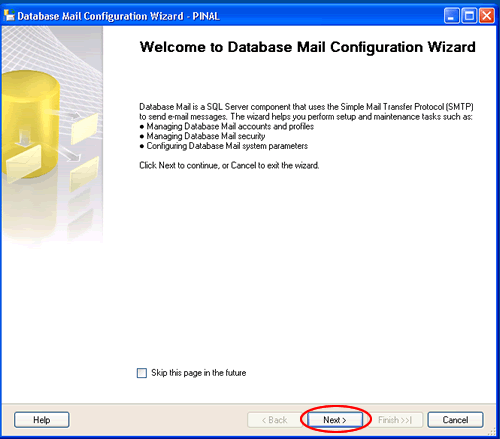
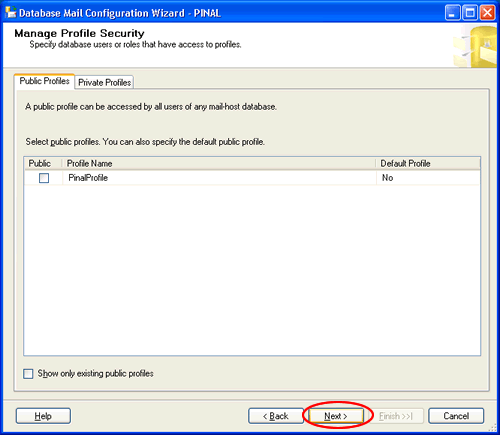
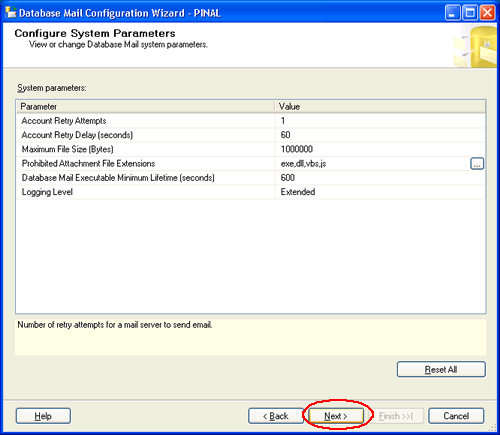
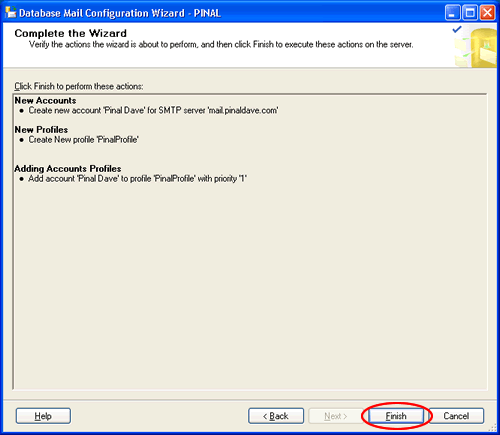
You need to create a profile and account using the Configure Database Mail Wizard which can be accessed from the Configure Database Mail context menu of the Database Mail node in Management Node. This wizard is used to manage accounts, profiles, and Database Mail global settings which are shown below:



Step 2) Configure Email:
After the Account and the Profile are created successfully, we need to configure the Database Mail. To configure it, we need to enable the Database Mail XPs parameter through the sp_configure stored procedure, as shown here:
sp_CONFIGURE 'show advanced', 1

GO

RECONFIGURE

GO

sp_CONFIGURE 'Database Mail XPs', 1

GO

RECONFIGURE

GO

Step 3) Send Email:
After all configurations are done, we are now ready to send an email. To send mail, we need to execute a stored procedure sp_send_dbmail and provide the required parameters as shown below:
USE msdb

GO

EXEC sp_send_dbmail @profile_name='PinalProfile',

@recipients='test@Example.com',

@subject='Test message',

@body='This is the body of the test message.

Congrates Database Mail Received By you Successfully.'
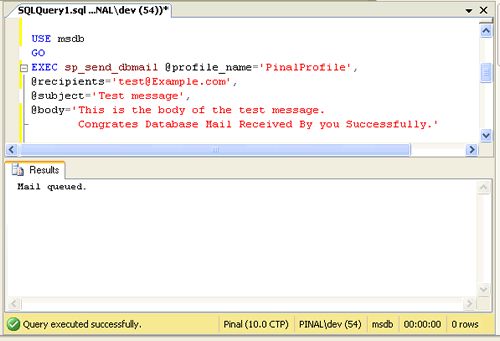
After all validations of the parameters entered are done, certain stored procedures are executed and the mail is queued by Service Broker, read more at SQL SERVER – Introduction to Service Broker.
Database Mail keeps copies of outgoing e-mail messages and displays them in the sysmail_allitems, sysmail_sentitems, sysmail_unsentitems, sysmail_faileditems . The status of the mail sent can be seen in sysmail_mailitems table, when the mail is sent successfully the sent_status field of the sysmail_mailitems table is set to 1 which can again be seen in sysmail_sentitems table. The mails that are failed will have the sent_status field value to 2 and those are unsent will have value 3.
The log can be checked in sysmail_log table as shown below:
SELECT *

FROM sysmail_mailitems

GO

SELECT *

FROM sysmail_log

GO

Status can be verified using sysmail_sentitems table.

After sending mail you can check the mail received in your inbox, just as I received as shown below.

Let me know what you think about this tutorial.
Reference : Pinal Dave (https://blog.sqlauthority.com)




478 Comments. Leave new
It means that you get total discounts at the time
of subscription. Try your better to find the web hosting service without down time.
The laws have been changing and many portals that offer services are finding it harder and harder to get
their word out there.
Hi,
I have a self contained database on MSSQL 2012 and user with password in that database.
How to enable that users from this contained database use sp_send_mail?
Thank you.
Hi mr. I configure all of them and i receive the message mail queued but i didnt receive the mail in my mail address coul dyou explain where i was a mistake please
Zaur,
Can you check database mail logs and look for any error?
Hi,
I am also facing similar issue.
My Database mail doesn’t seem to be working as expected.
I can see the below messages in database mail log (shutting/started)
DatabaseMail process is started
DatabaseMail process is shutting down
How to avoid this and receive mails continuously with out any failures.
There is also a message occasionally in the log.
1) Exception Information =================== Exception Type: Microsoft.SqlServer.Management.SqlIMail.Server.Common.BaseException
Message: The Transaction not longer valid. Data: System.Collections.ListDictionaryInternal
TargetSite: Void ValidateConnectionAndTransaction() HelpLink: NULL Source: DatabaseMailEngine HResult: -2146232832
StackTrace Information ===================
at Microsoft.SqlServer.Management.SqlIMail.Server.DataAccess.ConnectionManager.ValidateConnectionAndTransaction()
at Microsoft.SqlServer.Management.SqlIMail.Server.DataAccess.ConnectionManager.RollbackTransaction()
at Microsoft.SqlServer.Management.SqlIMail.IMailProcess.QueueItemProcesser.GetDataFromQueue(DataAccessAdapter da, Int32 lifetimeMinimumSec)
at Microsoft.SqlServer.Management.SqlIMail.IMailProcess.QueueItemProcesser.ProcessQueueItems(String dbName, String dbServerName,
Int32 lifetimeMinimumSec, LogLevel loggingLevel, Byte[] encryptionKey, Int32 connectionTimeout)
Can you please help me on this?
Sql server version is,
(Microsoft SQL Server 2017 (RTM) – 14.0.1000.169 (X64) Aug 22 2017 17:04:49 Copyright (C) 2017 Microsoft Corporation Express Edition (64-bit) on Windows Server 2012 R2 Datacenter 6.3 (Build 9600: ) (Hypervisor) )
Thanks
Pradeep
Many thanks, wonderful information fellas.
I do know Raj Napal who was an excellent attorney I’m sure, received received a huge number of situations
functioning extremely tough. Furthermore is a premier legal representative
around Canada.
Send An Email Alert Automatically?
When a new record is inserted into the database.
I want this to trigger an email that will be sent to all users who requested one when a new record was added.
I can’t figure the best way to set this up.
All help gratefully received.
Thanks
You can use service broker. Or you can use trigger to write a record in some table. That table can be used for sending emails.
what is the use of is_default ????
aditya – Refer documentation available https://docs.microsoft.com/en-us/sql/relational-databases/system-stored-procedures/sysmail-add-principalprofile-sp-transact-sql?view=sql-server-2017
Hi Pinal,
when i execute a ssis package via SP am getting the below error.When i execute manually or via job send mail task is working.Please let me know.
Description: An error occurred with the following error message: “Mailbox unavailable. The server response was: 5.7.1 Client does not have permissions to send as this sender”.
Sathiya – You need to run a profiler trace to find exact command used by SSIS.
Hi pinal, how is it possible to send mail through a proxy ?
Hi Pinal,
I am successfully able to send mails from SQl server. However if a single mail is sent to more than 100 recipients, mail is not delivered and following description is captured in sysmail_log table:
The mail could not be sent to the recipients because of the mail server failure.
(Sending Mail using Account 1 (2015-11-04T13:54:58). Exception Message: Cannot send mails to mail server. (Failure sending mail.).)
Any idea what could be blocking this mail? I am using SQL server 2012.
Pinalbhai,
Thank you for the article.
I am a new learner and this feature works fine for me. I have set up an outlook account as sender email under SMTP settings of the DBmail account.
When I check the sent items of this outlook email, it is empty. I expected to see all the emails that were sent from this account from DBmail. I wonder, why would the sent emails not be in the sent box. I tried basic and anonymous authentication.
Thanks
Sunil
Sunil,
Outlook is a client and in this case DBMail is a client. It has its own sent item etc.
hi pinal ,
i am getting an error – Attachment file C:\Login_Image.jpg is invalid. While attaching file with sql sp_send mail ,
Excellent tutorial, it was easy to follow and cerate the desired results. Cant ask for more than that
I have make all setting but auto mail is not sending and error occur.
Error is “The mail could not be sent to the recipients because of the mail server failure. (Sending Mail using Account 4 (2016-10-26T16:03:55). Exception Message: Cannot send mails to mail server. (Failure sending mail.).
)”
Hi Fuad husni,
Please help me to check where exactly I can see smtp mail configuration details like server name and port.
Thanks,
Hari
Hi,
I have a new issues. I’m facing an error as following. Kindly help me out this.
The mail could not be sent to the recipients because of the mail server failure. (Sending Mail using Account 4 (2017-03-22T09:13:29). Exception Message: Cannot send mails to mail server. (The SMTP server requires a secure connection or the client was not authenticated. The server response was: 5.7.1 Client was not authenticated).
)
That’s a pure authentication issue. Check for
1. User Name / Password.
2. Make sure SSL is checked in the Wizard.
3. Make sure you are having ports open. Test using Telnet.
4. Try sending email using other SMTP client from same machine.
Why Wrong mails don’t end up in the unsent table?
I tried to override from address in sp_send_dbmail, but it takes old profile from address. I don’t know why it is not overriding.
EXEC msdb.dbo.sp_send_dbmail @profile_name = ‘Pepal Public Profile’,
@from_address=’raj abc ‘,
@recipients = @SentToEmailAddress, @body = @EmailBody,
@subject = @EmailSubject, @body_format = ‘HTML’;
I try to override with . But not working.
Hi,
SQL Server 2016 is not capturing invalid email id in the sysmail_faileditems.
If the domain is not valid it is capturing in the faileditems. But if the email address is not valid, it says sent successfully.
Is there anything to do in settings to capture the invalid email address too
for example: abc@abc111.com is not captured as failed
abc@abc111.com? or abc@abccom or abc@abc!com is captured as failed.
Hi,
After configure the database mail, when i am trying to send mail using sp_send_dbmail. i am getting below error.
Can someone please help me to fix this?
1) Exception Information =================== Exception Type: Microsoft.SqlServer.Management.SqlIMail.Server.Common.BaseException
Message: The Transaction not longer valid. Data: System.Collections.ListDictionaryInternal
TargetSite: Void ValidateConnectionAndTransaction() HelpLink: NULL Source: DatabaseMailEngine HResult: -2146232832
StackTrace Information ===================
at Microsoft.SqlServer.Management.SqlIMail.Server.DataAccess.ConnectionManager.ValidateConnectionAndTransaction()
at Microsoft.SqlServer.Management.SqlIMail.Server.DataAccess.ConnectionManager.RollbackTransaction()
at Microsoft.SqlServer.Management.SqlIMail.IMailProcess.QueueItemProcesser.GetDataFromQueue(DataAccessAdapter da, Int32 lifetimeMinimumSec)
at Microsoft.SqlServer.Management.SqlIMail.IMailProcess.QueueItemProcesser.ProcessQueueItems(String dbName, String dbServerName,
Int32 lifetimeMinimumSec, LogLevel loggingLevel, Byte[] encryptionKey, Int32 connectionTimeout)